





Automated PDF acceptance starts before a developer quotes the work. A file can generate successfully and still show the wrong total, omit a row or cut off a long description. Agree what correct output means, which examples will demonstrate it and who can approve the final version.
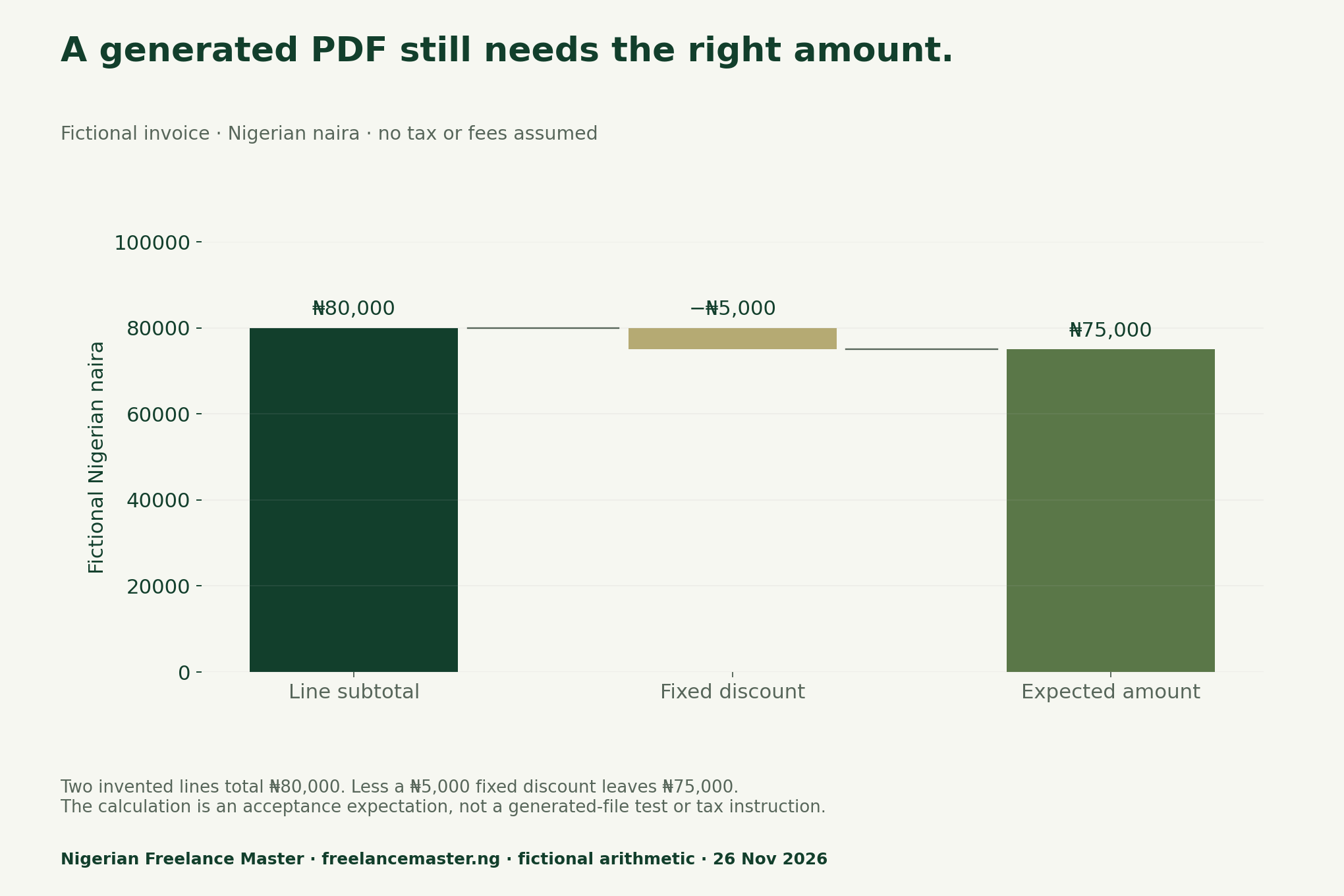
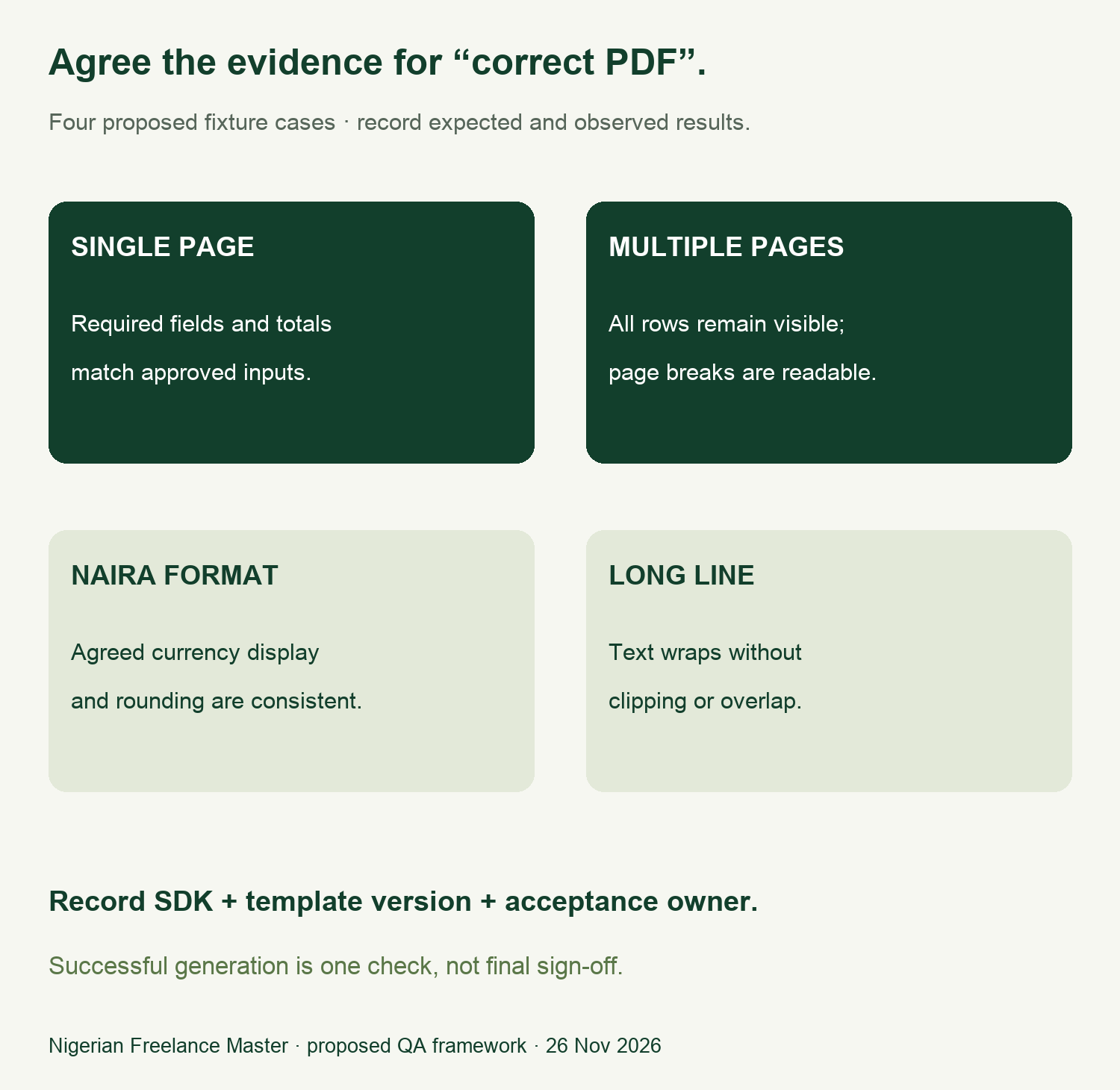
For Nigerian freelancers building document workflows, a small test packet makes that conversation concrete. This guide uses a fictional invoice: ₦80,000 in line items, less a ₦5,000 discount, leaves ₦75,000 before any assumed tax or fees. Four proposed fixture cases cover values and printable layout. No Adobe service call or customer failure was tested.
What changed in Adobe’s November patch
Adobe’s PDF Services release notes list a .NET SDK 4.4.1 patch dated 20 November 2026. The note describes a minor fix in the Create PDF operation, without identifying the affected inputs. That is a reason to record the version used in your project, not evidence that a particular client template was broken or repaired.
Keep that patch separate from the .NET SDK 4.4.0 release dated 10 August 2026. The earlier release added generating PDFs from Markdown, alongside other changes. Markdown support should not be presented as the November addition. A release note for one SDK also does not establish identical behavior across every language, template or input format.
Adobe’s Create PDF documentation explains the operation and supported conversion workflows. Use the documentation for your actual stack when planning implementation. The checks below are our proposed acceptance framework; they do not reproduce Adobe’s unspecified fix or certify a service implementation.
Separate successful generation from accepted output
Define the output the client expects to receive. Identify required fields, the source of each value and the intended document structure. Agree which elements must stay on one page and which may continue. Record the currency display and any client-approved rounding rule before the first test run.
Then distinguish a successful operation from a correct deliverable. A readable PDF file is useful evidence that generation completed. It does not by itself prove the amounts, descriptions or page breaks. Keep those checks visible in the scope so a proposal does not promise quality that nobody has defined.
Use synthetic inputs for a public demonstration. Real invoices can expose customer details, account information or commercially sensitive work. The sample below contains only invented service lines and amounts. It is a calculation example, not a tax invoice, a price recommendation or a model of Nigerian tax treatment.
Automated PDF acceptance needs an expected value
Our first invented service has two units at ₦25,000, giving ₦50,000. The second has three units at ₦10,000, giving ₦30,000. Together they total ₦80,000. Subtract the fixed ₦5,000 discount once to obtain ₦75,000. No tax, withholding, payment fee or other charge is assumed in this example.
| Fictional input | Calculation | Expected amount |
|---|---|---|
| Service A | 2 × ₦25,000 | ₦50,000 |
| Service B | 3 × ₦10,000 | ₦30,000 |
| Subtotal | ₦50,000 + ₦30,000 | ₦80,000 |
| Fixed discount | Subtract once | ₦5,000 |
| Amount before tax or fees | ₦80,000 − ₦5,000 | ₦75,000 |
Check the source values and calculation independently of the visual design. For example, an attractive amount box can still display the subtotal rather than the discounted amount. Name the expected field in the fixture record so the test does not pass merely because ₦75,000 appears somewhere in the file.
Use four fixture cases with distinct purposes
Begin with a single-page invoice containing the approved required fields and known totals. It establishes a simple baseline that a reviewer can inspect quickly. Keep the input and expected values beside the run record, so the result can be explained without opening private production data.
Next, use enough invented rows to produce multiple pages in the agreed template. Check that every row survives, headings remain understandable and totals are placed as agreed. Do not choose an arbitrary universal page count; the expected layout depends on the client’s template, paper size and permitted content.
A separate naira-format case checks the agreed currency representation, separators and decimals. Inspect the rendered output instead of assuming the source string will display correctly. If the project uses NGN rather than the symbol, record that choice. Do not silently change financial precision to improve appearance.
Finally, test a deliberately long description. Inspect wrapping at the agreed page width and any transition onto the next page. Look for missing words, overlap with the amount column and clipped content. A short sample line cannot demonstrate that longer client-approved descriptions will remain readable.
Record versions, failures and approval
For each run, record the SDK version, source-template version and synthetic input reference. Add the expected value or layout, observed result, status and issue owner. When a fix is made, retain the earlier observation and record the retest. A version change should not inherit an older approval without the agreed checks.
A byte-for-byte match is not the default acceptance target for this example. PDFs may contain metadata or other implementation details that differ while their intended values and layout remain equivalent. Define the acceptance criteria appropriate to the engagement.
Before delivery, have the named acceptance owner review the agreed results and approve the correct version. Record remaining limitations and the authorized delivery channel. A developer’s own passing run and a client’s acceptance are related but separate records. Neither should be invented or inferred from a successful upload.
Download the reusable acceptance packet
The release-scope table keeps the two dates separate. The fictional input sheet makes the arithmetic reproducible. Fill the blank fixture run and acceptance record with approved project details, keeping sensitive data private. These worksheets define a proposed process; their presence does not mean an actual test or professional approval occurred.
- Adobe release-date and scope comparison (CSV)
- Fictional invoice inputs and expected arithmetic (CSV)
- Blank four-fixture run record (CSV)
- Blank deliverable acceptance record (CSV)
Method and limits: official Adobe documentation checked on 26 November 2026. The only numerical analysis uses invented inputs: (2 × 25,000) + (3 × 10,000) − 5,000 = 75,000. One substantive chart supports that acceptance expectation. The infographic maps four proposed fixture cases. We did not run the SDK, identify the patch’s affected inputs or measure customer failure rates.
For another delivery boundary, use our client deadline cutoff guide. For approved collaboration, see the encrypted document access preflight. Suggested citation: Nigerian Freelance Master, “Automated PDF Acceptance: Agree What Correct Means Before Quoting”, 26 November 2026.