






Figma Slides client claims need an evidence check before a freelancer sends the deck. A tidy chart or convincing paragraph can still use the wrong measure. Figma’s new agent announcement makes this timely, but the review question applies to any presentation: does the source support the exact statement the audience will see?
This guide follows a fictional eight-slide pitch. It catches a 20% conversion claim when the supplied input only measures visits. A chart, two-check infographic and four CSV tools show how to review numbers, permission and speaker notes. No client documents, generated-deck benchmark or sales-lift result is used.
What changed for Figma Slides client claims work
Figma’s 23 November 2026 announcement describes its agent in FigJam and Slides, with attachments and connected context. Its release notes say general availability covers paid plans. The announcement describes turning existing material into a draft presentation and refining its story or notes.
That is a product-availability statement. It does not establish that a particular draft is accurate, that every source is appropriate for a new audience or that using the feature increases sales. We did not run a feature performance test. The workflow below is an editorial review framework built around synthetic inputs.
For a Nigerian freelancer, the practical decision is what to approve before delivery. Keep the original brief and permitted evidence beside the deck. A tool may help assemble material, but the final claim still needs a traceable basis. A polished presentation should make its meaning easier to assess, rather than hiding uncertainty.
Start with approved source material
Before drafting, identify which material the client has approved for this purpose and audience. Separate a file you can access from a file you may reuse. A previous client’s logo, quote or internal chart should not enter a new pitch merely because it is available in a connected workspace.
Record the source reference and permission basis in a private register. Use non-identifying references in any public demonstration. If the basis is unclear, hold the item while the appropriate owner decides. The worksheet does not grant reuse rights or replace an agreement with the client.
This also makes review more efficient. An approver can inspect the evidence behind the exact slide item, rather than hunting through a folder of plausible sources. Keep approved and unapproved material distinct in your working process, and check the final export so removed material does not survive in notes or hidden content.
Traffic growth and conversion growth answer different questions
Our fictional input contains 1,000 visits in Period A and 1,200 in Period B. The traffic increase is 200 visits, or 20% relative to the starting 1,000. Purchases are not supplied. There is therefore no basis to calculate a purchase conversion rate or claim that conversion increased by 20%.
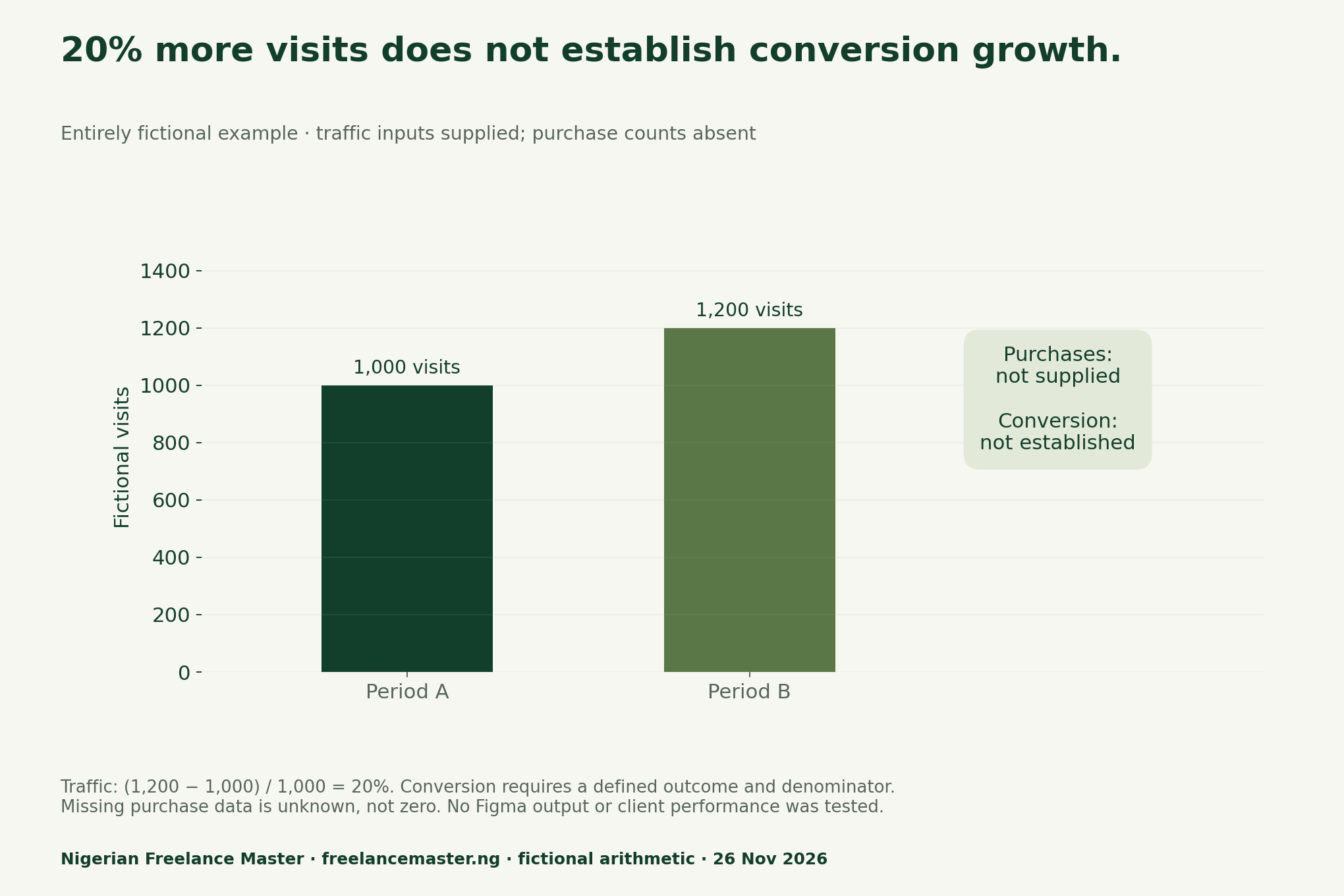
The appropriate rewrite keeps the measured concept: traffic rose 20% in this fictional example. It also preserves the period labels and the fact that the figures are synthetic. If the actual source only measures traffic, do not silently rename the y-axis, headline or speaker note as conversion. A design change cannot create the missing outcome data.
| Item | What the fictional inputs support | Review decision |
|---|---|---|
| Traffic | 1,000 to 1,200 visits; 20% increase | Keep the measure and label the example |
| Purchases | No counts supplied | Do not infer growth |
| Conversion rate | Outcome and denominator not established | Remove the unsupported rate claim |
Use a claim register across the full deck
Give each claim a slide and notes reference. Copy the exact wording, then record its source, period, unit and denominator. Add the permission basis and the reviewer responsible for the decision. Finally, mark keep, rewrite, remove or hold. A blank field is an unresolved question, not an approval.
Our eight-slide sample includes an objective, a traffic statement, an unsupported conversion claim, a logo-permission question and proposed work. Those items require different checks. An objective may be an agreed aim; it should not look like a measured result. A proposed schedule should retain its assumptions instead of appearing as completed delivery evidence.
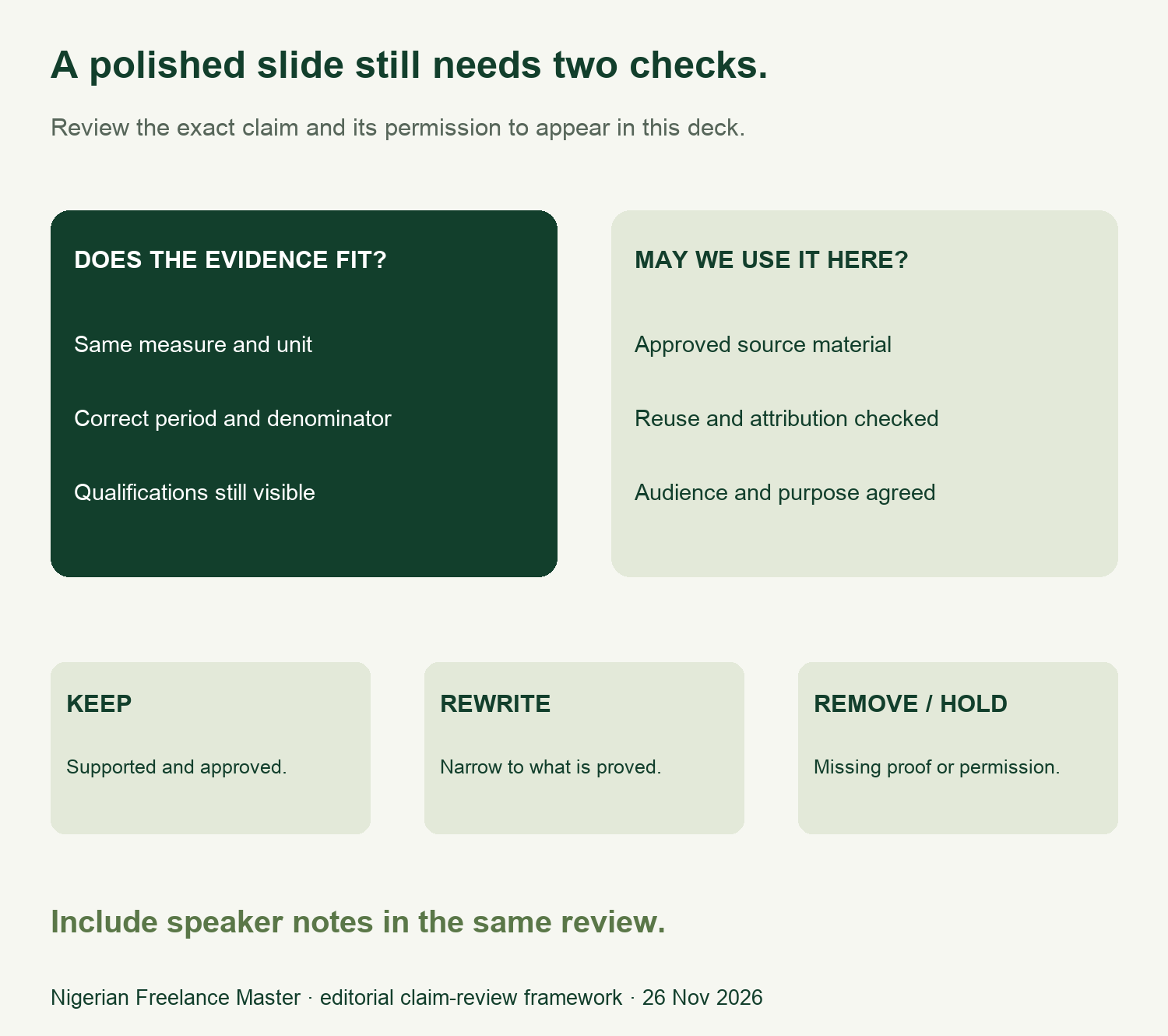
Do not turn the sample’s eight rows into a score for the software or a typical failure rate. We selected them to illustrate review decisions. The useful output is the reasoning beside each item, not a percentage of slides marked green. A single unsupported headline can matter more than several correctly formatted decorative slides.
Review charts, attribution and speaker notes together
For each chart, inspect the labels, scale and source period as well as the visible bars. Check whether the headline says more than the plotted measure supports. If a chart uses an estimate, preserve that qualification. Do not let a short title become a stronger claim than the accompanying evidence.
Apply the same check to speaker notes. A cautious slide can still be undermined by an unsupported statement in the presenter’s script. Review quotations, names and attribution in the final form that will be delivered. Where the client must approve wording, record that approval against the correct version.
After corrections, export the intended deliverable and inspect it again. Compare the approved wording, chart labels and notes with the source register. Archive a clear version reference so later edits do not inherit approval accidentally. The release checklist includes the recipient and approved delivery channel, because the right file sent to the wrong audience is still a failed handoff.
Download the fictional audit and blank review tools
The traffic file contains the synthetic counts and deliberately missing outcomes. The eight-slide sample explains each decision without a real client name. A blank register supports your own private review, and the release checklist covers final export and delivery. Replace sample assumptions with approved evidence rather than presenting this demonstration as completed client work.
- Fictional traffic inputs and missing conversion measures (CSV)
- Fictional eight-slide claim audit (CSV)
- Blank slide and speaker-note claim register (CSV)
- Blank final-deck release checklist (CSV)
Method and limits: product sources checked on 26 November 2026. Traffic growth is calculated as (1,200 − 1,000) / 1,000 = 20%. Conversion is left unestablished because purchase data is absent. One substantive chart is appropriate for this measure distinction. The infographic addresses a separate evidence-and-permission relationship. No accuracy rate, feature benchmark or sales outcome is claimed.
For a complementary delivery check, see our client deadline and verified-receipt guide. More tools appear in Research & Reports. Suggested citation: Nigerian Freelance Master, “Figma Slides Client Claims: Check the Evidence Before Sending”, 26 November 2026.