



A Shopify custom app Dev Dashboard handoff should show the client which app and store the record concerns, what you actually checked, and who owns any unresolved question. Dashboard visibility is useful. However, it does not by itself establish that a merchant has accepted the handoff or that a business integration works.
This guide gives Nigerian Shopify freelancers a read-only practice inventory, an evidence matrix and four downloadable CSV tools. The example uses an invented shipping app called Parcel Bridge. It contains no live merchant account, customer data, credentials, token values or copied application logs.
Shopify custom app Dev Dashboard handoff: what changed on 17 November
Shopify’s 17 November 2026 developer changelog says custom apps created by merchants or staff in the Shopify admin now appear in the Dev Dashboard. Existing installations retain their scopes and webhook subscriptions, and existing tokens continue to work. The move does not automatically replace tokens or enable IP restrictions.
The parallel merchant-facing changelog describes the same management change. Neither announcement proves that your particular client can locate the correct app or knows who should verify it. Therefore, keep the product update separate from your dated handoff evidence.
Also distinguish app types before interpreting security notices. The separate outside-organisation allowlist announcement names its affected custom-app scope and exceptions, including merchant-created apps. This article is not a compliance audit and does not apply that rule indiscriminately to every app visible in a dashboard.
Build a nonsecret inventory before saying the handoff is finished
Use a store alias and an app alias in the practice sheet. Then record a date, the expected installation and a plain-language scope summary. These labels help a reader understand what the record covers without publishing store identifiers, secrets or real customer information.
Our synthetic inventory has three checks. First, can the practice record identify the app and intended store? Second, does it note the expected installation and scope summary? Third, is there evidence that the designated merchant operator knows who owns the verification? Each check gets its own status.
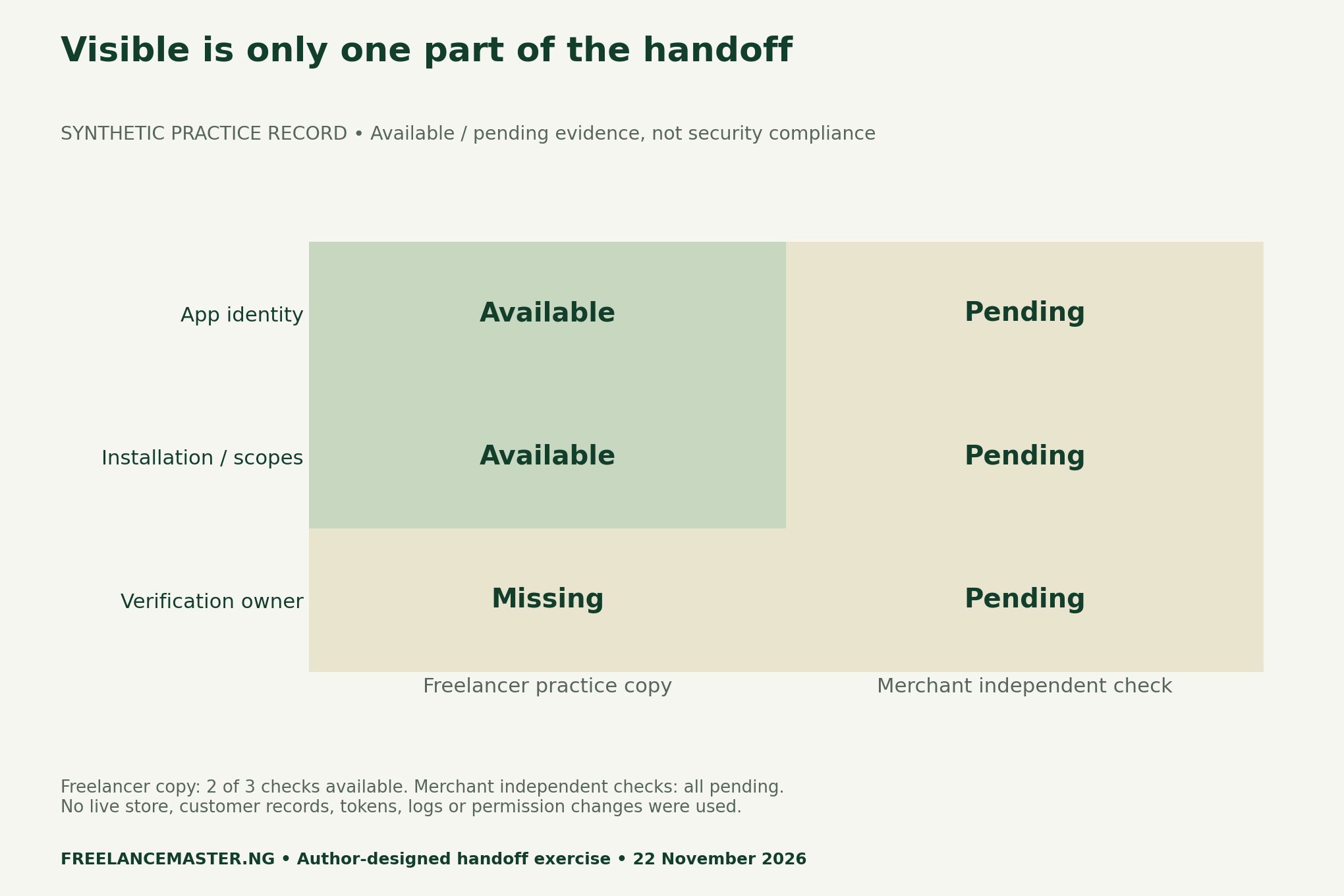
Two available rows do not turn the missing ownership row into a partial acceptance. Nor do they establish that the merchant independently reproduced either check. Keep both columns visible. A client-facing handoff is clearer when it states exactly which evidence is still absent.
Use four distinct status labels
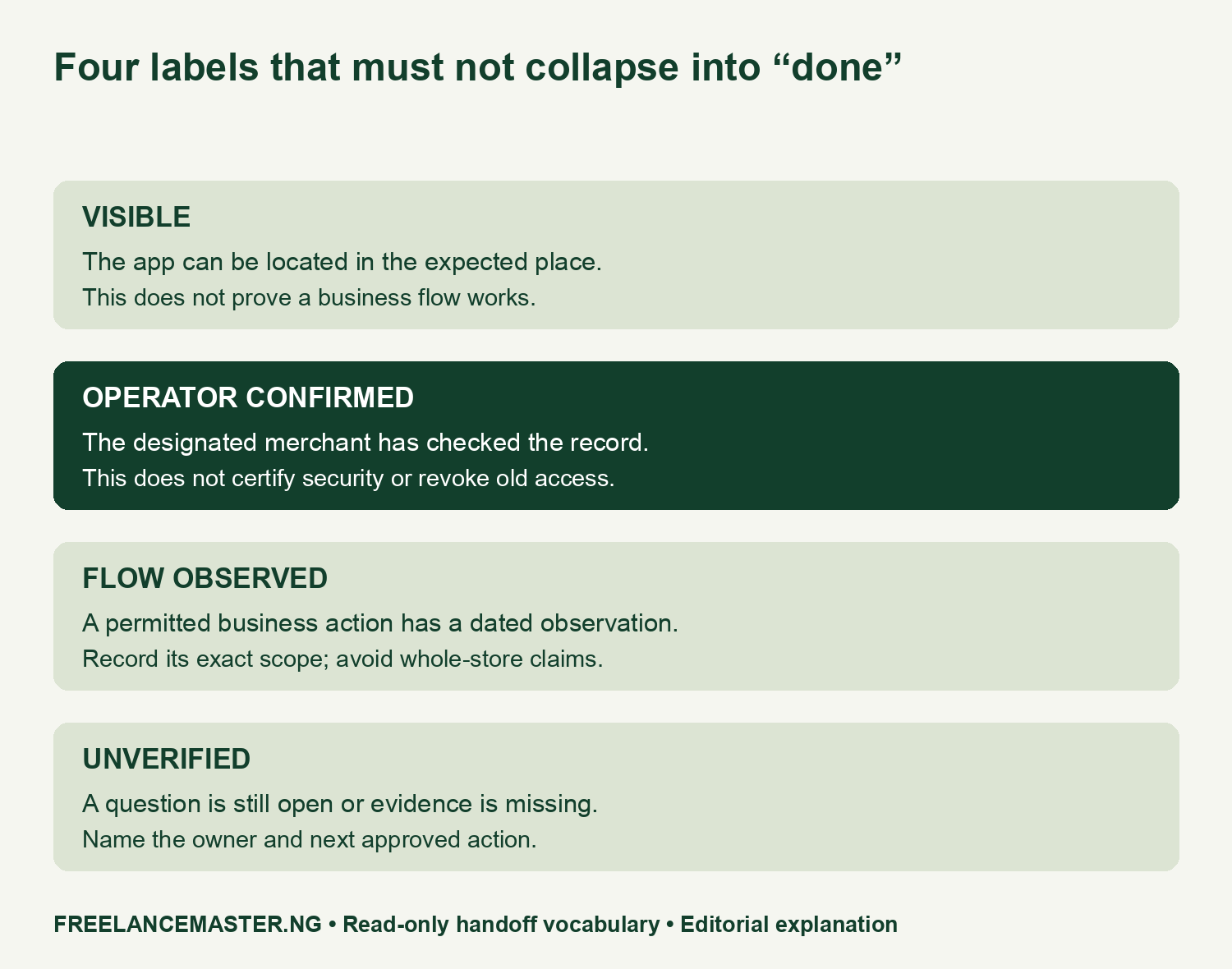
Visible means the app can be located in the expected place. Operator confirmed means the designated merchant has checked the relevant record. Flow observed means a specific permitted business action has a dated observation. Unverified means a question remains open or evidence is missing. These are editorial recording labels, not Shopify certification statuses.
For example, finding Parcel Bridge in the practice dashboard would not prove that a daily fulfilment sync completed. Equally, a working sync would not prove a former contractor no longer has access. Those questions need separate evidence and an authorised owner; they should not inherit an answer from the visibility row.
Ask the merchant to own the independent verification
A concise handoff should name the agreed merchant operator, the nonsecret app alias and the remaining question. Ask that person to confirm the relevant record through their existing authorised access. Do not grant new access, change roles or share credentials simply to make an acceptance checkbox easier to complete.
If a discrepancy appears, pause the affected conclusion and record who will decide the next action. That may be the merchant’s authorised administrator or another agreed owner. The worksheet does not authorise you to rotate tokens, change IP restrictions, download sensitive logs or alter a live integration.
Make any business-flow observation narrow and dated
The blank flow sheet starts with the expected business action, permitted observation and responsible operator. Record the actual time, result and known limit only when an authorised check occurs. Leave those fields blank in a portfolio example instead of inventing a successful fulfilment or webhook result.
Meanwhile, use the boundary register to keep source statements apart from your own observations. The migration’s general continuity statement is not your test result. A dated app record is not proof of security compliance. If the client needs a broader audit, define that separately with the appropriate scope and authority.
For another example of precise deliverables, see our source-packet versus finished-output portfolio. The same communication principle applies: show what the client can inspect, identify the owner and label what has not been tested.
Method, boundaries and reusable downloads
We checked Shopify’s first-party announcements on 22 November 2026. The inventory, three checks and statuses are author-designed practice content. No live shop was accessed, no customer data or secrets were downloaded, and no permissions or security controls were changed. The example cannot establish an actual merchant’s acceptance or compliance.
- Synthetic app handoff evidence matrix (CSV)
- Blank nonsecret app handoff worksheet (CSV)
- Source claims and evidence-boundary register (CSV)
- Blank authorised flow-observation record (CSV)
Suggested citation: Nigerian Freelance Master, “Shopify Custom Apps: Check the Client Can Own the Handoff”, 22 November 2026. Retain the synthetic labels with any reused matrix.