





Encrypted Google Docs access needs a preflight before an external freelancer agrees to a live editing deadline. Being sent a link is only the start. The client’s file, your named account, required key access and permitted actions must all fit the work you promise to do.
Google’s new real-time collaboration beta makes this a timely question for Nigerian editors, researchers and analysts. This guide proposes a client-admin check using dummy content. A fictional two-person matrix shows why opening a file does not prove the whole workflow is ready. No real account, confidential document or encryption setup was tested.
What the new encrypted Google Docs beta changes
Google’s 20 November 2026 announcement introduces simultaneous editing and commenting for eligible client-side encrypted Docs in an allowlisted beta. Enrolled domains create eligible new files with this mode enabled. Authorized people with key access can collaborate on an existing RTC Doc shared with them even when their own domain is not enrolled.
The announcement lists Enterprise Plus, Education Standard, Education Plus, Frontline Plus, Assured Controls and Assured Controls Plus. It is a scoped beta, not a claim that every Google account or encrypted document supports the same collaboration mode. The host administrator should confirm the actual file and enrollment before you schedule a joint editing session.
There is an important documentation distinction. At our 26 November check, Google’s general encrypted-file collaboration help still describes sequential editing and waiting for an editor to finish. The newer announcement describes the eligible beta. Do not erase that distinction or assume the general help page proves what a particular enrolled file can do. Ask the administrator which mode applies.
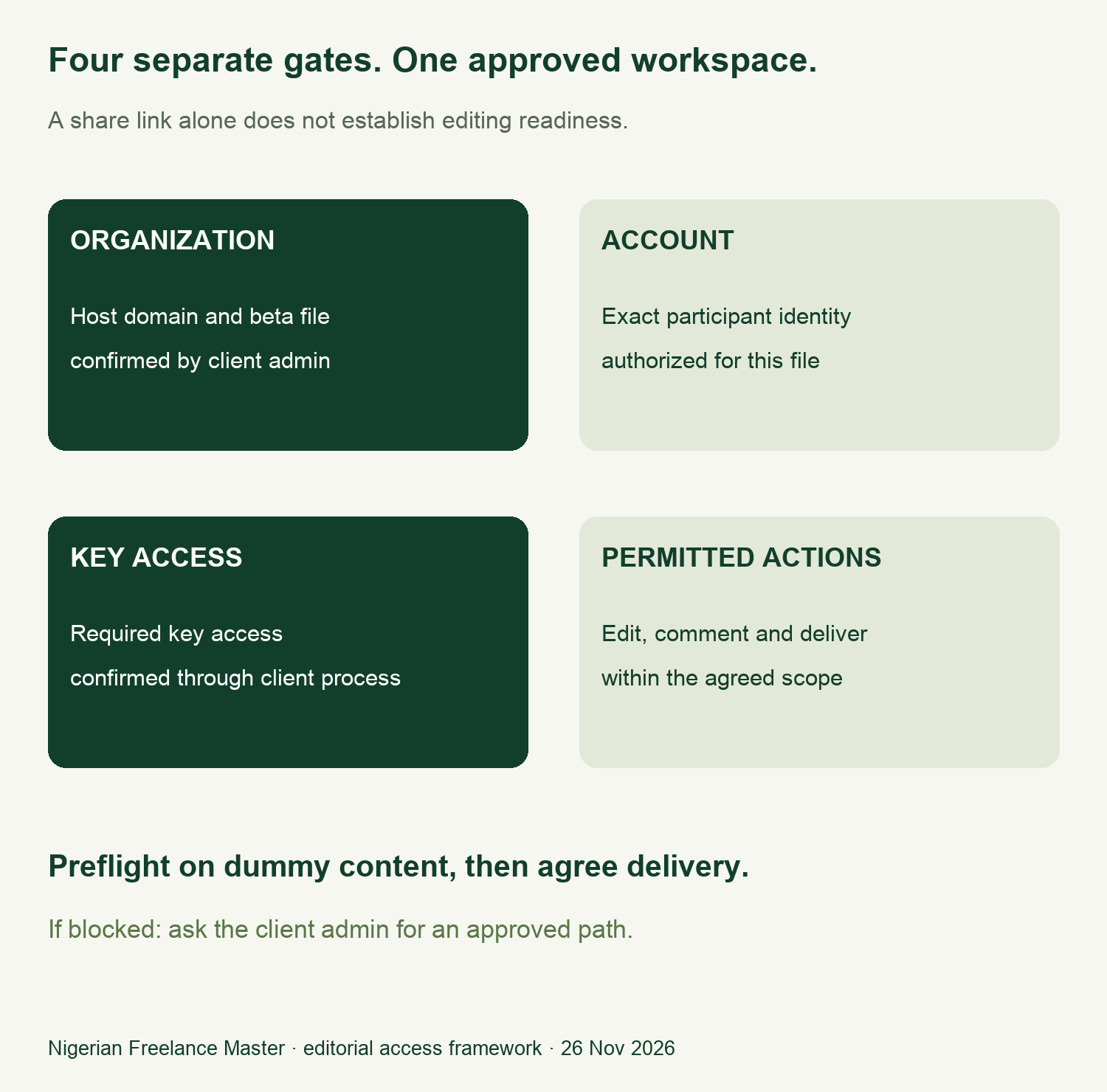
Separate four access questions
First, confirm the host organization and the intended file. Ask whether this is an eligible beta document, rather than an older encrypted file with different behavior. A screenshot of a product announcement does not answer that question. Record the administrator’s confirmation without copying private configuration details into a public worksheet.
Next, identify the exact account approved for the engagement. The address you use in an ordinary document may differ from the account the client authorized. Keep that identity aligned with the agreed work. Do not try another person’s account or ask for their credentials when your own access fails.
Third, have the client administrator confirm required key access through the organization’s own process. File authorization and key access are separate checks. Our register records a non-sensitive confirmation reference; it should never contain passwords, key material, recovery codes or private authentication details.
Finally, list the actions the job needs. Opening, editing together, reviewing comments, exporting and delivering are different tasks. Permission for one does not establish permission for all. Agree which actions are required and who can approve an alternative before a live deadline depends on them.
Run the preflight with dummy content
Ask the client administrator to arrange one approved test document containing no confidential information. Use the two named participants who will do the work, through their approved accounts. Record the test time in WAT and a harmless file reference. Keep client names and internal URLs out of any public demonstration.
Check that each participant can open the document. Then verify the required joint editing behavior and whether each person sees the agreed test comments. A successful open test cannot stand in for the edit test. Record observed results separately, with an owner for any unresolved issue.
The matrix below is entirely fictional. Both participants open the dummy file, but one invented edit check is blocked. That participant’s comments check remains untested. Closeout is unconfirmed for both. These are selected teaching examples, not observed Google behavior, a beta failure rate or a diagnosis of a security problem.
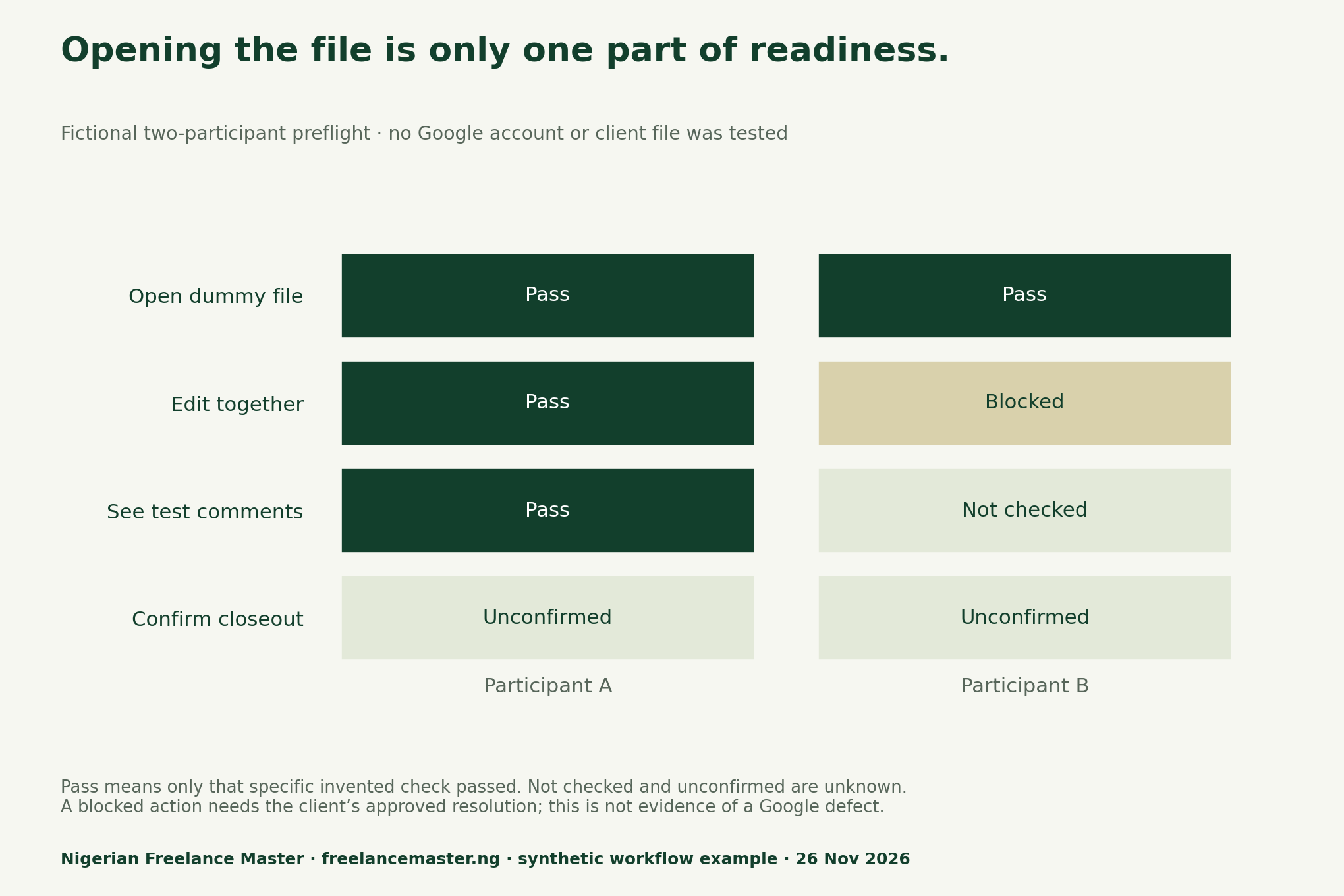
The appropriate decision is to keep the unresolved work visible. Ask the client administrator to investigate the blocked action and agree an approved next step. Retest the affected action after that change. Do not infer the cause from a generic error or turn a single passing cell into an overall readiness claim.
Agree the editing and approval method
An editorial engagement often needs more than typing in the same file. Agree how changes will be reviewed, how comments will be resolved and who owns final approval. The method should match what the actual environment supports, rather than the habits of an ordinary unencrypted document.
The general help page describes viewer and editor roles, says commenter permission is unsupported, and notes limitations around suggestions and responding to encrypted comments from Gmail. Confirm the beta file’s current behavior with the administrator. Do not promise suggestion-mode editing or email-based review without checking that specific workflow.
Write the agreed review method into the delivery plan. For example, the client may require a named approver to resolve comments inside the file. That is a proposed arrangement to agree, not a default setting we tested. The action log leaves room for the owner, observed result and approved retest.
If access is blocked, change the plan with the client
Notify the client early when a required action fails. Describe the action and its effect on the deadline without sending confidential screenshots through an unapproved channel. Ask for an approved alternative or revised timing. The decision belongs with the client’s authorized owner, not with an improvised personal-account copy.
Keep the original confidentiality and delivery boundaries intact. Do not move the document into a personal workspace, disable protections or share access more widely to make the task easier. Encryption also does not automatically settle contractual, privacy or legal-compliance questions. Those depend on the actual arrangement and applicable requirements.
Agree closeout before calling the job finished: final approval owner, permitted export or delivery, required retention and the client’s access-removal process. Follow the agreed instructions rather than inventing a deletion period. Historical versions and client records may have separate requirements.
Download the preflight tools
Use the source-scope table to distinguish the dated beta from general guidance. The fictional matrix illustrates recordkeeping only. Fill the blank administrator preflight and action log with non-sensitive references for your own approved workflow. A completed worksheet is evidence of recorded checks, not an independent security assessment.
- Beta and general-help source-scope table (CSV)
- Fictional two-participant preflight matrix (CSV)
- Blank client-admin access preflight (CSV)
- Blank dummy-document action and retest log (CSV)
Method and limits: official sources checked on 26 November 2026. The matrix has eight deliberately invented action-participant cells. It is not a sample of users, a pass-rate estimate or an actual access test. One substantive status chart supports the readiness decision; the separate infographic explains the four access gates. Product scope and account behavior can change, so use current administrator confirmation.
For the content side of approval, see our client presentation claim-review guide. For deadline planning, see the verified-delivery cutoff worksheet. Suggested citation: Nigerian Freelance Master, “Encrypted Google Docs Access: Can Your External Editor Collaborate?”, 26 November 2026.