




AI admin time savings are useful only when the whole workflow gets shorter without lowering quality. A quick first draft can still require lengthy checking, corrections and filing. For a Nigerian freelancer, the practical test is the time you can actually recover from your own recurring work.
A new foreign survey provides a starting question, not your answer. Below, we separate reported benefits from measured minutes and provide a paired-task audit. You can use it without importing overseas hourly rates or pretending that free minutes automatically become income.
AI admin time savings: what the new survey measured
Fiverr published its Next Era of Work Report on 12 November 2026. Talker Research surveyed 2,850 freelancers and 2,900 full-time employees online in the US, UK, Canada, Germany and Australia between 21 and 29 September. Nigeria was not included.
Among AI users across those markets, 31% of freelancers and 20% of employees reported reclaiming time through less administration. The US comparison for reduced administrative or repetitive work was 33% versus 24%. These are different population/outcome comparisons, so we show them separately.
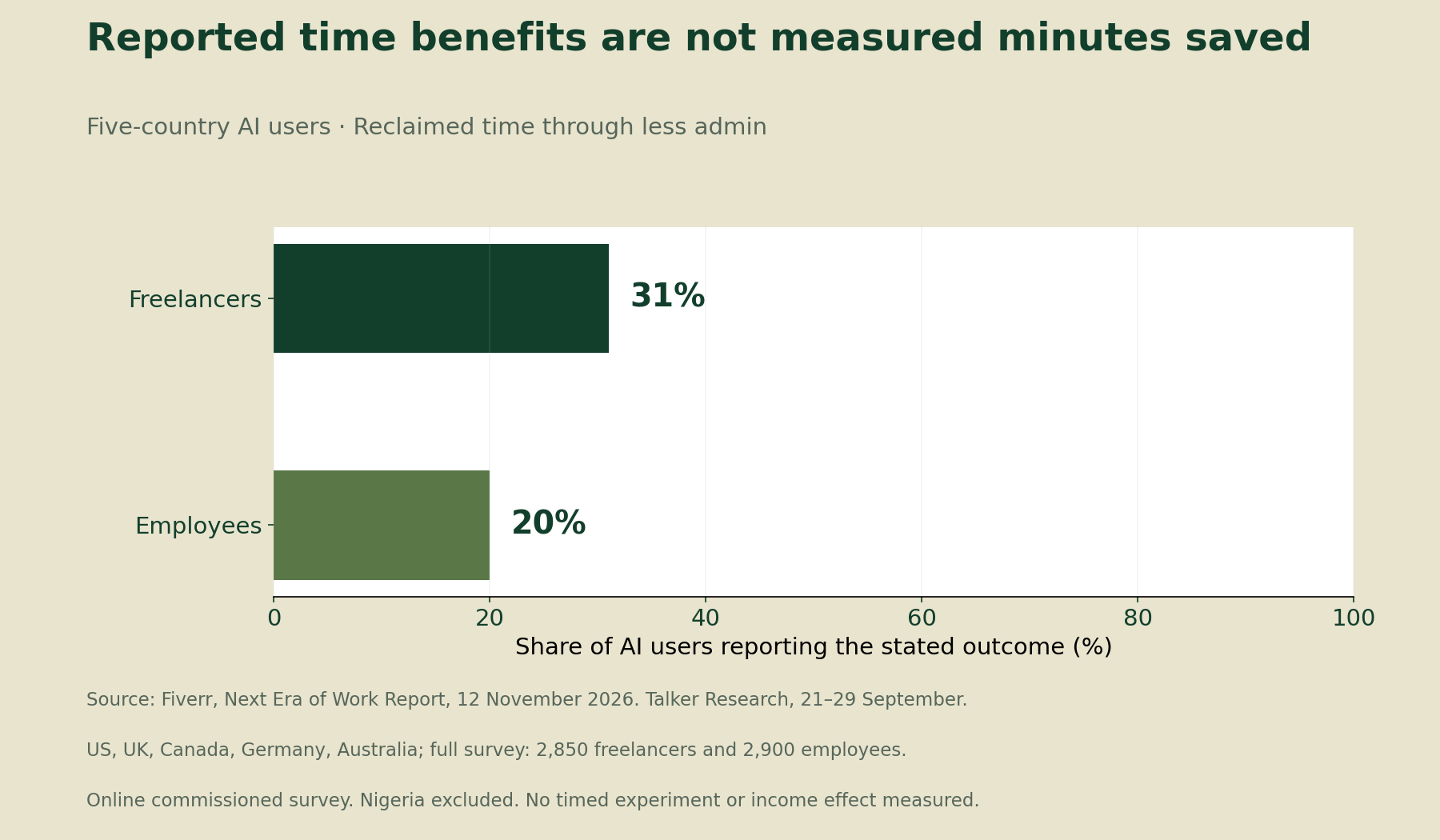
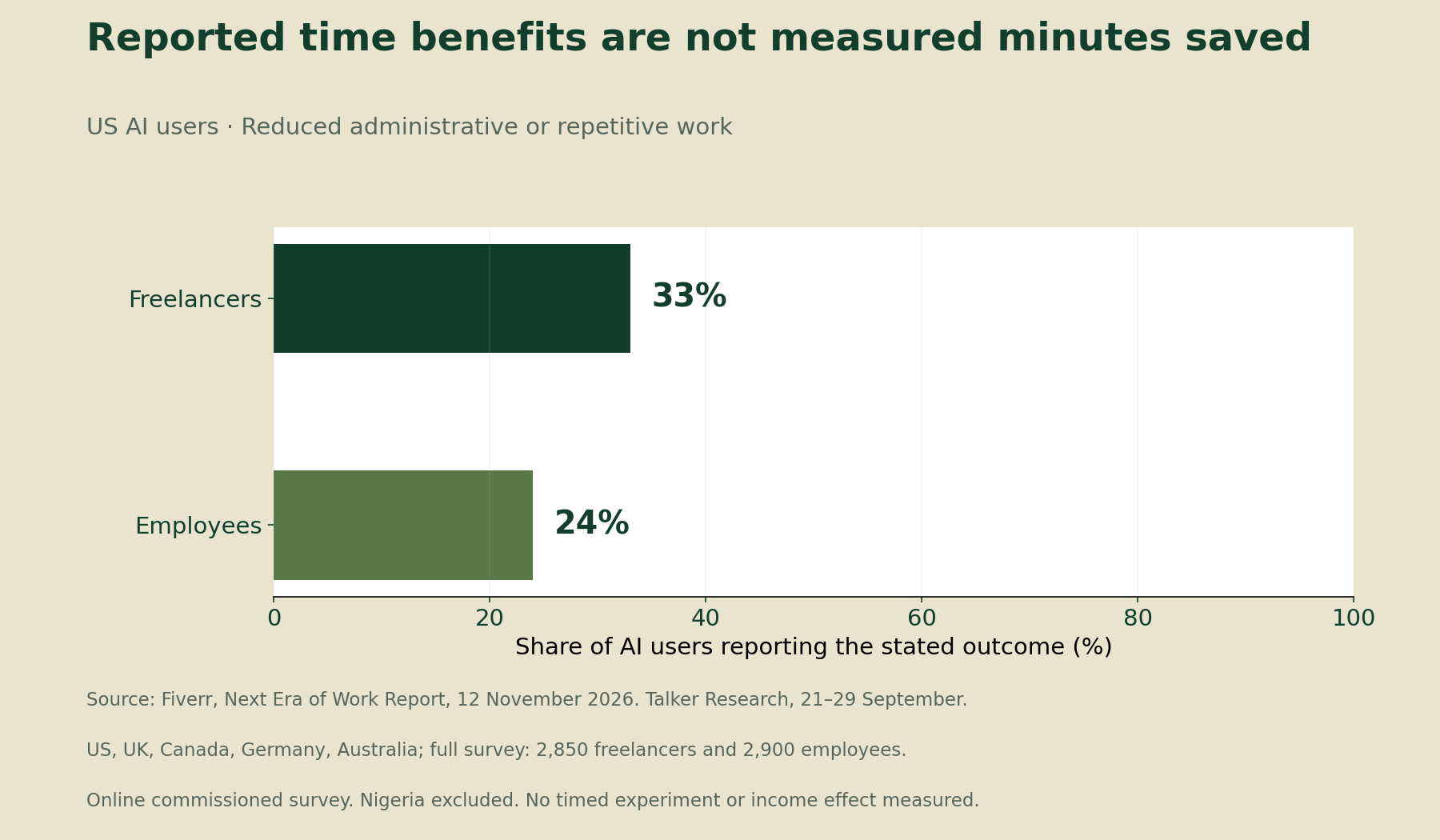
The calculated gaps are 11 and 9 percentage points respectively. Neither chart measures hours saved. The commissioned, internet-based survey records respondents’ perceptions, not a timed experiment or a Nigerian productivity estimate. The full survey counts are not the subgroup denominators, and the report does not supply uncertainty for these contrasts.
Choose one recurring task and define “finished”
Start with a task you repeat: organising public research notes, drafting your own routine administrative text or preparing a non-confidential checklist. Avoid combining unrelated jobs under a broad label such as “admin”. A meaningful comparison needs a reasonably similar task type and workload.
Next, write the acceptance requirement before timing either method. For example, a filing checklist may need complete document names, correct dates and no missing action owner. Both methods must meet that same requirement. A shorter but incomplete output has not passed the comparison.
Keep client permission and data handling separate from speed. Do not upload confidential material just to test a tool. Use synthetic or public inputs where appropriate, and obtain the relevant client’s approval before introducing their information into a new service.
Count setup, review and corrections as work
Record the baseline total
Time the current method from preparation to an accepted, filed result. Include checking and final administration. Retain a note about task size, interruptions and difficulty so a later comparison has context.
If one task happens during a long power or connection interruption, record that separately. Do not silently remove inconvenient observations or attribute every difference to the AI tool. Your working conditions form part of the practical decision, but they do not prove a software effect.
Disclose how you allocate setup
An assisted method may need account setup, a reusable instruction, a template or a trial run. Log the total preparation time first. Then state how much of it you allocate to this task and why.
If you spread setup over expected reuse, keep that assumption visible. Recalculate when actual reuse differs. Otherwise, a method that looks efficient after repeated use can conceal a substantial cost for a one-off task.
Check the assisted output to the same standard
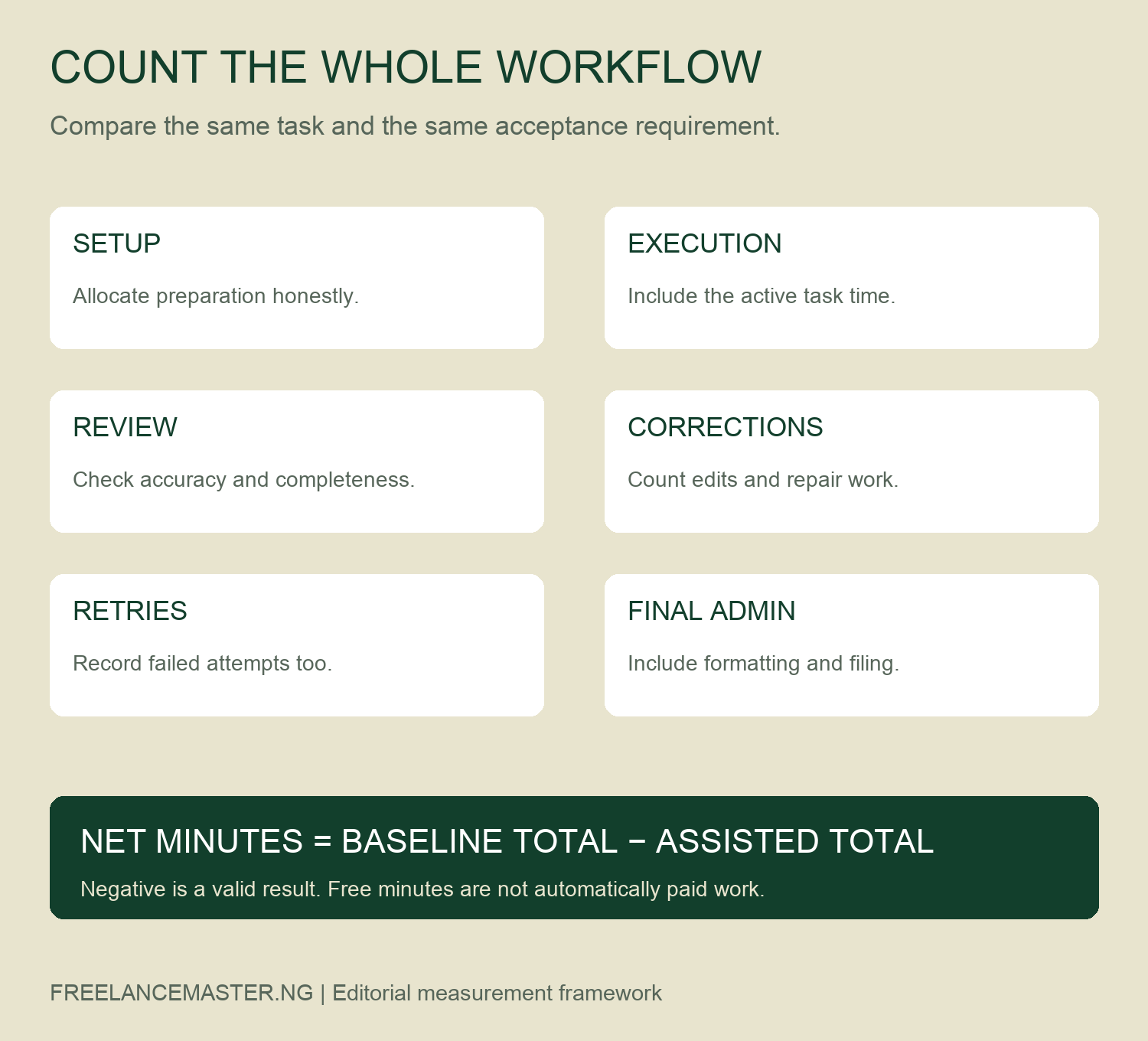
Log execution, review, corrections, retries and final filing separately. Include failed attempts and the time spent deciding whether an output is acceptable. These components make it easier to see where a claimed saving disappears.
Use the acceptance field in the worksheet. If the result fails, record the failure and the remaining work. Do not describe the task as completed simply because the tool produced an answer.
Calculate net minutes before discussing benefits
Net minutes = baseline total − assisted total. The assisted total includes the disclosed setup allocation and every recorded work component. A negative result means the assisted workflow took longer under the comparison you logged.
For example, review effort may erase an execution saving. That is a useful finding, not a result to hide. It may suggest revising a narrow instruction, changing the task selection or keeping the existing method.
Repeat the comparison on comparable tasks before drawing a firm conclusion. One trial can be affected by familiarity, task complexity or the order in which you tried the methods. Keep the raw rows and describe exceptions instead of reporting only your fastest attempt.
Separate recovered time from higher earnings
After an accepted comparison, record where the recovered minutes went. Rest, other paid work, unpaid sales and fragmented gaps are different outcomes. A small gap between commitments may not form a usable block for another task.
For a weekly review, compare your logged net minutes with the blocks you could actually use. Do not convert the survey’s percentages into a daily time saving. Likewise, do not multiply minutes by a foreign advertised rate and call the result additional income.
Our instant-availability time audit examines a separate issue: time committed while waiting for work. Use this article for your own administrative workflow, and keep waiting time distinct from task execution.
Decide whether to keep, revise or stop the method
Keep a method when your records support useful savings at the required quality and acceptable cost. Revise it when a specific avoidable component dominates. Stop or defer it when checking, risk or complexity outweighs the benefit for this task.
A faster administrative process is not evidence that you should sell a new client service. Our AI job-screening guide addresses feasibility before bidding. That decision requires its own scope and acceptance checks.
Finally, retain negative results. A clear note explaining why you rejected a tool can protect your time better than another productivity recommendation. The objective is a workable routine, not a predetermined success story.
Download the data and blank audit tools
- Fiverr survey comparisons and calculated gaps (CSV)
- Blank paired admin-task timing log (CSV)
- Blank recovered-time allocation ledger (CSV)
- Admin time-audit field dictionary (CSV)
The survey file contains two reported comparisons and calculated percentage-point gaps. The timing and allocation files are blank. The dictionary explains the fields. We have not run a Nigerian freelancer experiment or filled the worksheets with invented productivity results.
Method and limitations
We checked the report on 14 November 2026 and calculated each gap by subtracting the employee share from the freelancer share. The two charts preserve the source populations and outcomes. They should not be pooled, treated as Nigerian estimates or interpreted as causal effects.
The personal audit is an editorial measurement protocol. It is not a representative study, a controlled evaluation or a promise of income. Suggested citation: Nigerian Freelance Master, AI Admin Time Savings: Measure What You Actually Get Back, 14 November 2026. When sharing your own results, retain the task definition, quality requirement and setup assumptions.