






Freelance contract phishing can arrive inside an ordinary-looking request to sign, review or open a document. The useful response is an independent check: verify the task through a known client contact or an independently opened service, rather than trusting the message’s appearance or its own contact details.
This guide includes two charts, a verification-map infographic, eighteen inert practice cards and four CSV downloads. The exercises contain no live malicious links, attachments, credentials or real client identifiers. They are teaching material, not a measured phishing-detection experiment.
What the latest email-threat report says
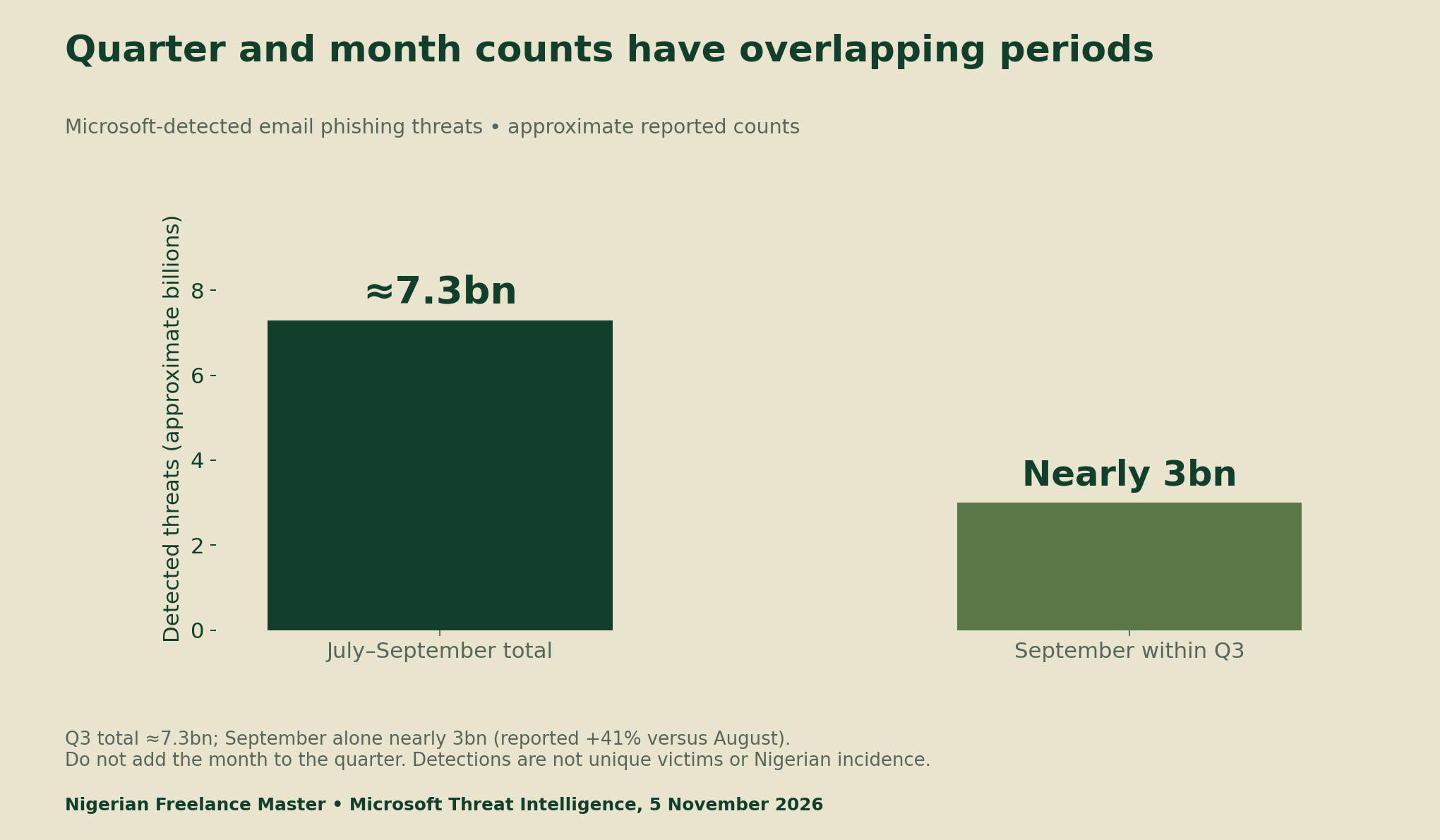
Microsoft’s 5 November 2026 threat report covers July–September. It records approximately 7.3 billion detected email phishing threats, including nearly 3 billion in September, a reported 41% rise from August. These are detections in Microsoft’s view, not unique victims or a Nigerian incidence estimate.
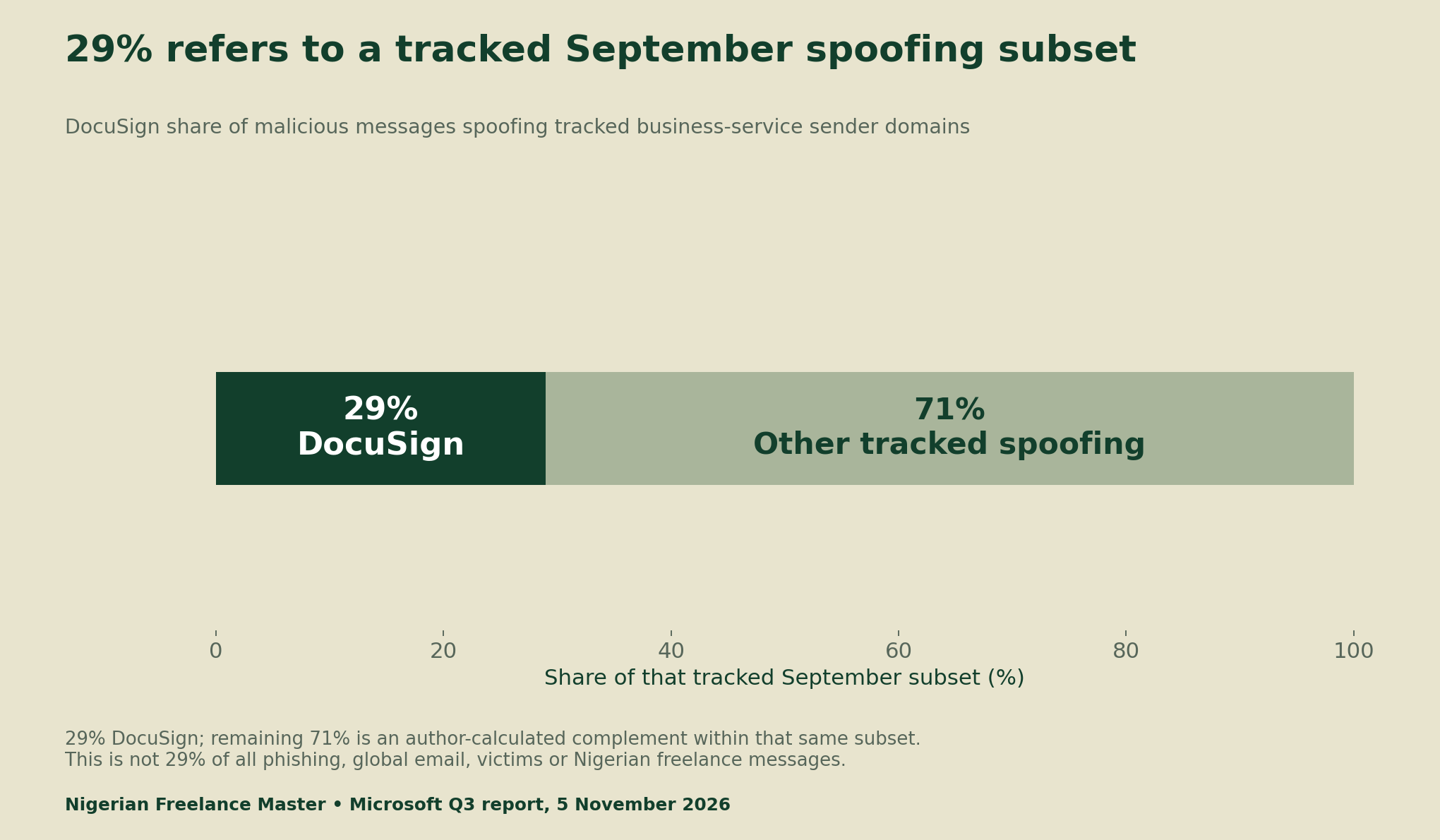
The report also identifies approximately 129 million malicious messages spoofing tracked business-service sender domains during Q3. DocuSign accounts for 29% of the tracked September subset. That denominator matters: it does not mean 29% of all global phishing or 29% of messages received by freelancers.
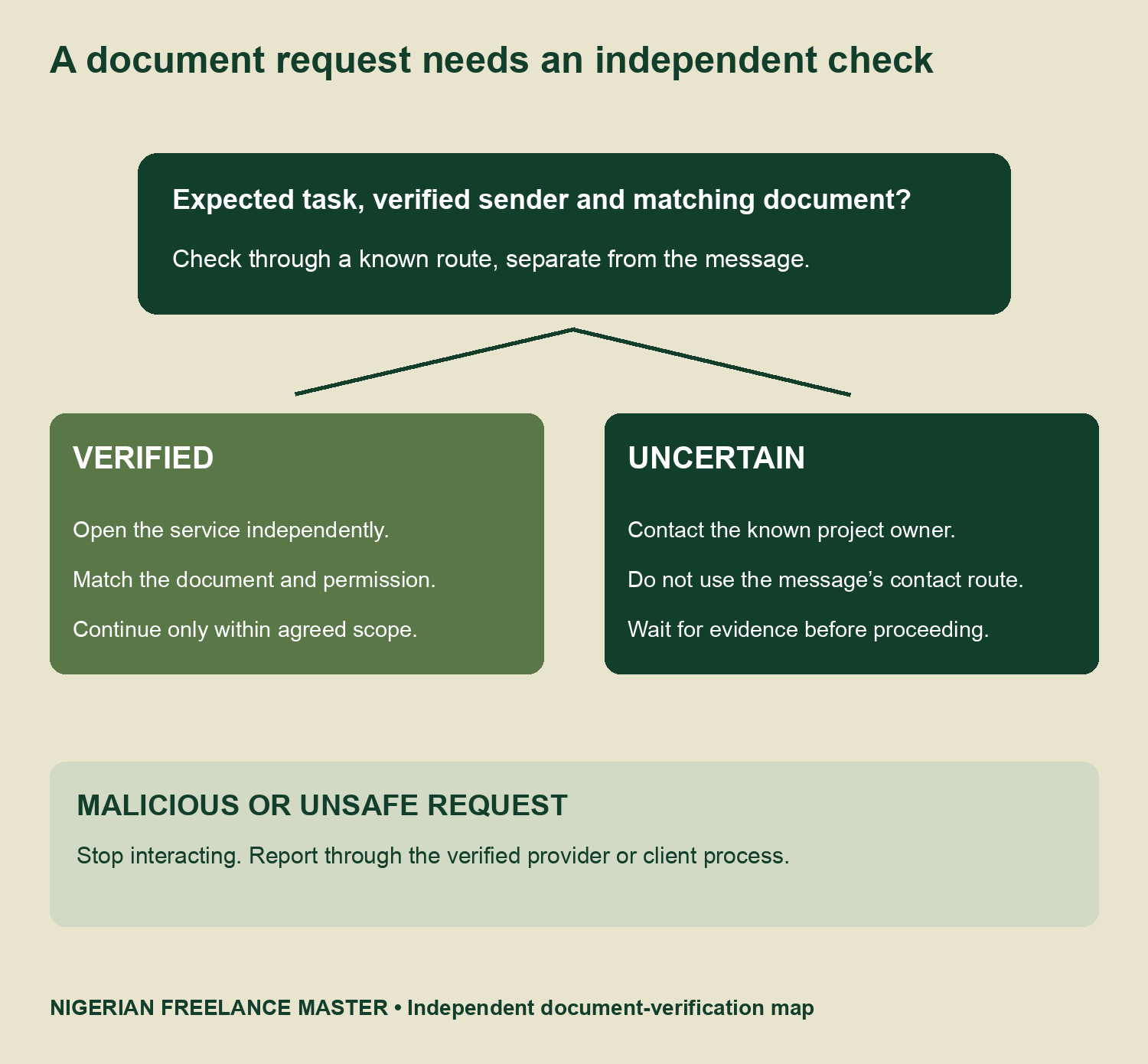
Check freelance contract phishing through a known route
First ask whether you expected the document, from whom and for which project. A matching project name is useful context, but it is not proof. Verify a document reference inside the service you opened independently or with the project contact you established before the questionable message arrived.
Microsoft’s phishing-protection guidance advises against opening suspicious links or attachments. It recommends reaching the organisation through an independently found official site or contacting a known person by another route. A new contact supplied in the suspicious message cannot independently confirm that same message.
A familiar logo, a polished layout or a plausible display name is insufficient. Sender authentication can provide useful evidence, yet it does not by itself prove that an unexpected request is authorised. A legitimate account may also send an inappropriate or compromised request. Match the actual action to the project and permission you agreed.
Keep document review separate from account access
A contract request should not automatically lead to a new software installation, remote session or disclosure of credentials. Pause if the supposed next step asks you to disable a warning, disclose an authentication code or install an unverified viewer. Use the service’s normal verified route to establish what is actually required.
Do not test a suspicious link by opening it on another device or bypass a browser warning to see what happens. Keep the original evidence for the appropriate reporting process, without forwarding a live lure casually to other people. This practice pack uses inert text precisely so no reader needs to interact with a real threat.
Use eighteen inert practice cards
Our pack contains six expected-and-verified scenarios, six explicitly identified impersonation exercises and six scenarios with insufficient evidence. The key assigns three next actions: continue through the independently verified route, stop and report, or verify first. The categories are deliberately balanced for teaching.
For instance, an expected contract visible in the service you opened independently supports the first route. A case explicitly stating that an impostor requests your password belongs in stop-and-report. A polished but unexpected reminder with no matched document remains uncertain; its appearance does not settle the decision.
These cases are not a realistic prevalence sample, and some disclose the answer in their setup to teach the distinction. They cannot validate an automatic phishing detector. Use them to practise explaining a next step and identifying what evidence is still missing, rather than counting every cautious response as a correct detection.
A short intake checklist you can print
| Record | Question |
|---|---|
| Expected task | Which project and document were already agreed? |
| Independent route | Which established contact or separately opened service confirms it? |
| Matching reference | Does the verified account or contact identify this document? |
| Requested action | Is signing, downloading, paying or changing access actually authorised? |
| Uncertainty | What remains unverified, and are there unsafe instructions? |
| Decision | Continue within verified scope, verify first, or stop and report. |
The intake CSV supports the same questions. Leave missing evidence visible instead of writing “safe” because a message looks familiar. Recording a checked date also prevents an old confirmation from being reused for a different document or a later change in payment instructions.
Reporting and account recovery depend on the provider
Use the mail provider’s reporting tool or the client’s established security process. Microsoft’s guidance describes Report > Report phishing in supported Outlook contexts. A work or school account may require the organisation’s IT team. Other platforms have their own verified reporting and recovery routes.
If you believe a personal Microsoft account is compromised, follow its current official recovery guidance. It distinguishes device security, password recovery and account-setting checks. We do not present one generic sequence as sufficient for every provider, device or account. If client data, payments or work access may be affected, notify the relevant authorised parties through trusted channels.
Do not turn a practice session into an invented experiment
The scoring register leaves result cells blank. No participants have been recruited and no before-and-after improvement has been measured for this pack. If a later authorised exercise is run, freeze the cases and answer key, record the round and retain the chosen action and reason.
Count unsafe continuation, unnecessary stopping and missing verification separately. A legitimate request wrongly rejected is a different error from an unsafe request followed. Avoid reporting a single “accuracy” number without the category counts and denominators. Do not score blanks as correct answers or zeros as untested outcomes.
- Threat-report metrics, periods and denominator dictionary (CSV)
- Eighteen inert practice cards and answer key (CSV)
- Blank practice scoring register (CSV)
- Blank document-request intake checklist (CSV)
Our job-screening guide helps separate technical ability from authorised access. The support-permission guide distinguishes drafting, sending and account actions. Both principles matter when a document request tries to expand your scope.
Method and limitations
Research checked 10 November 2026. We retained the primary Microsoft report, kept quarterly and monthly scopes distinct and calculated only the 71% complement within the stated September subset. The independent-check framework and inert practice pack are editorial teaching tools, not a guarantee that a request is safe.
Suggested citation: Nigerian Freelance Master, “Freelance Contract Phishing: Verify Document Requests Safely,” 10 November 2026. Credit Microsoft for its threat measures and this report for the checklist and practice material. Send source-backed corrections through our contact page.