




A Canva Brush freelance workflow should earn its place through accepted deliverables, not a headline speed claim. Nigerian designers need to know whether the whole job becomes quicker after preparation, corrections, quality checks and export. A faster AI response alone cannot answer that.
This guide supplies a paired six-brief protocol, five figures, a blank timing log and a hypothetical break-even grid. It does not claim that we ran Brush or measured freelancer savings. Use the tools to test your own workflow before changing prices or delivery promises.
Research checked 31 October 2026. Canva announcement: 29 October 2026. All cost examples are hypothetical; no Nigerian subscription quote is supplied.
What Canva’s Brush announcement actually claims
Canva’s announcement describes Brush as powering supported design edits in Canva AI for Pro subscribers. Its launch comparison claims up to 69% faster general design editing and 46% lower cost per edit task than its previous design agent.
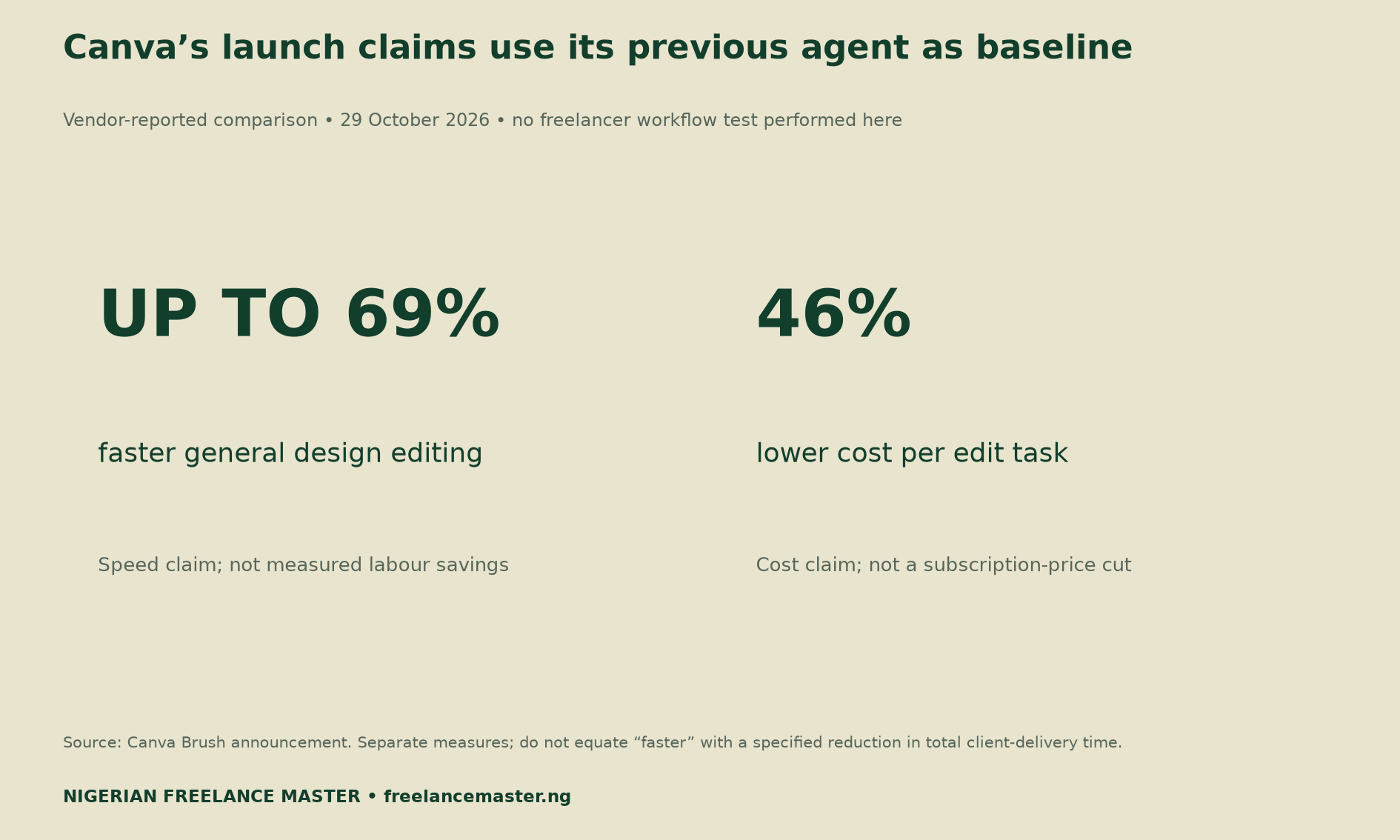
These are vendor comparisons. The cost figure is not a 46% subscription-price cut. The announcement also lists Brand Kit support, attachment referencing and image-heavy layout improvements as work still in development. Check the feature and supported tasks in your own account before testing.
The official newsroom listing dates the announcement to 29 October. Retain the original source and date with any benchmark you later publish.
Why editing speed differs from your delivery cost
A client pays for a usable output with the agreed content, dimensions and quality. The work may include collecting assets, understanding the brief and preserving approved elements. You still need to inspect the result and open the exported file.
Therefore, time the entire route to acceptance. If prompting saves time but correcting unintended changes takes longer, the net gain could be small or negative. Record that result rather than replacing it with the vendor percentage.
Also keep “faster” separate from a percentage reduction in elapsed time. We do not convert the 69% claim into a specific number of minutes saved. The announcement does not establish your starting time, workload or network conditions.
Set up a Canva Brush freelance workflow trial
Create six synthetic briefs that resemble work you understand. Use two text-heavy briefs, two image-heavy briefs and two multi-page briefs. Keep the source assets fictional or properly licensed, and avoid confidential client designs.
For each brief, state exact wording, output dimensions and elements that must remain unchanged. Save the starting file before either method runs. Both methods must work towards the same acceptance conditions.
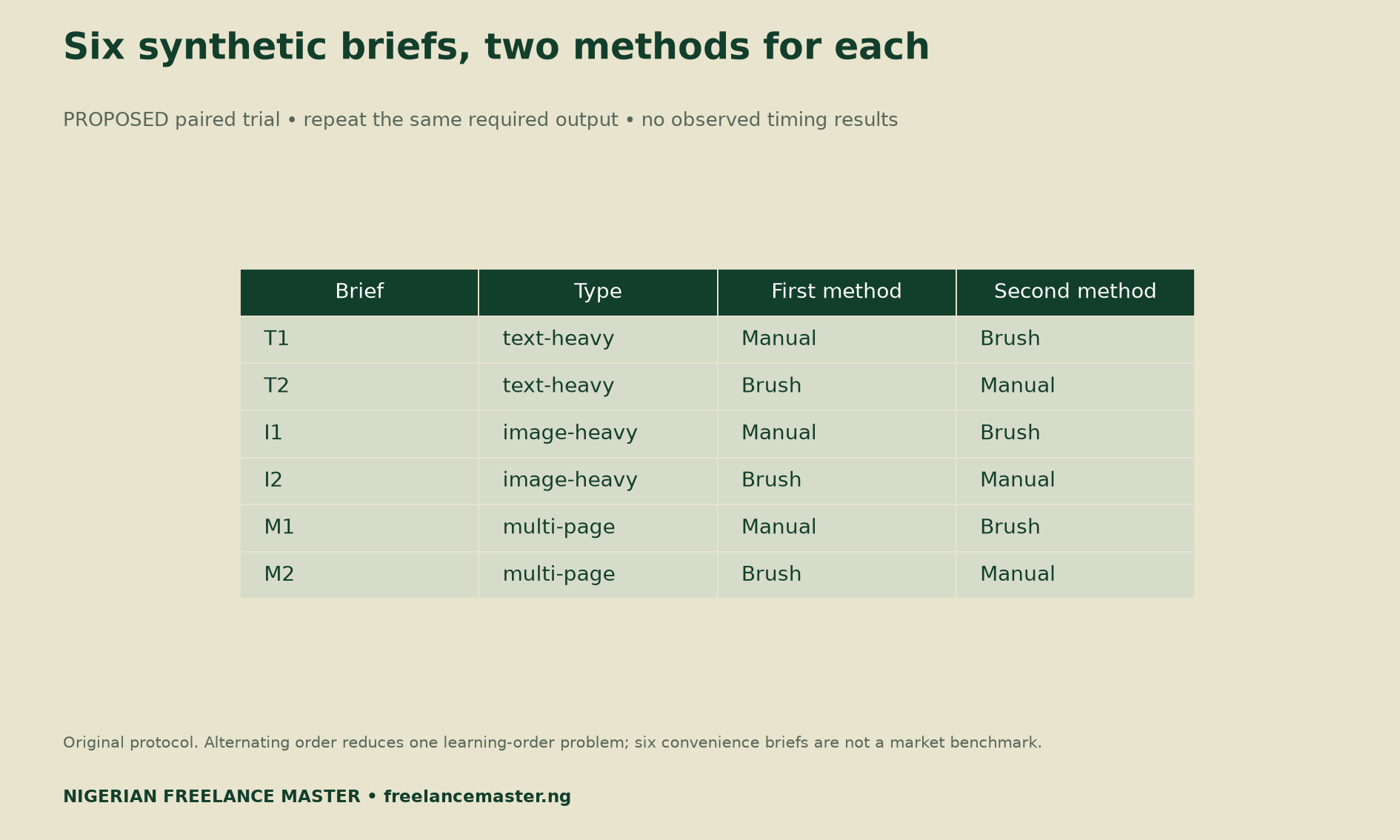
Alternate the order: manual first on the first brief in each pair, Brush first on the second. This helps limit one learning-order effect. It does not remove every bias, because the same designer gains familiarity while working.
Use the same device and comparable network conditions where practical. Log the date, account plan, feature availability and relevant tool version. If Brush is unavailable or the chosen task is unsupported, record that limitation instead of treating it as a completed trial.
Log six time components for both methods
Start the timer when you begin preparing the brief and assets. Record preparation, prompting, waiting, correction, quality review and export as separate fields. A manual run can legitimately have no prompting time, but use zero only when you observed that none was needed.
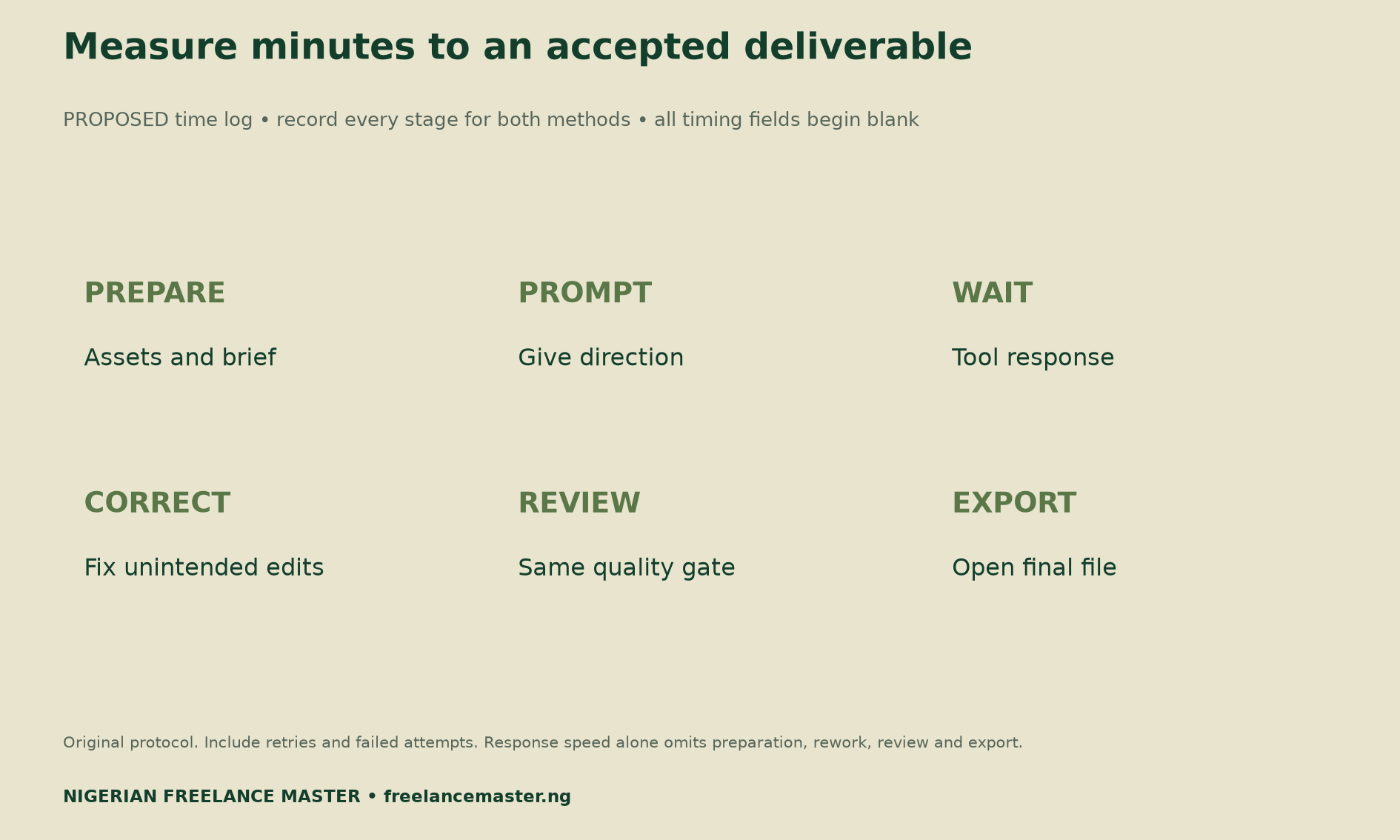
Count every attempt. If an edit fails, record the failure and the extra work required. When a design changes something outside the brief, log that unintended change and its correction time. Do not discard a difficult case simply because it makes the tool look worse.
A blank field means unmeasured, while zero means measured and none occurred. Keep those meanings distinct. Where the record is incomplete, leave the total and savings result unavailable until you can reconcile the missing entries.
Apply the same quality gate
Before looking at timing results, inspect the required wording, dimensions and type readability. Then check whether approved elements remain intact and whether the exported file opens correctly. The checklist should apply equally to manual and Brush outputs.
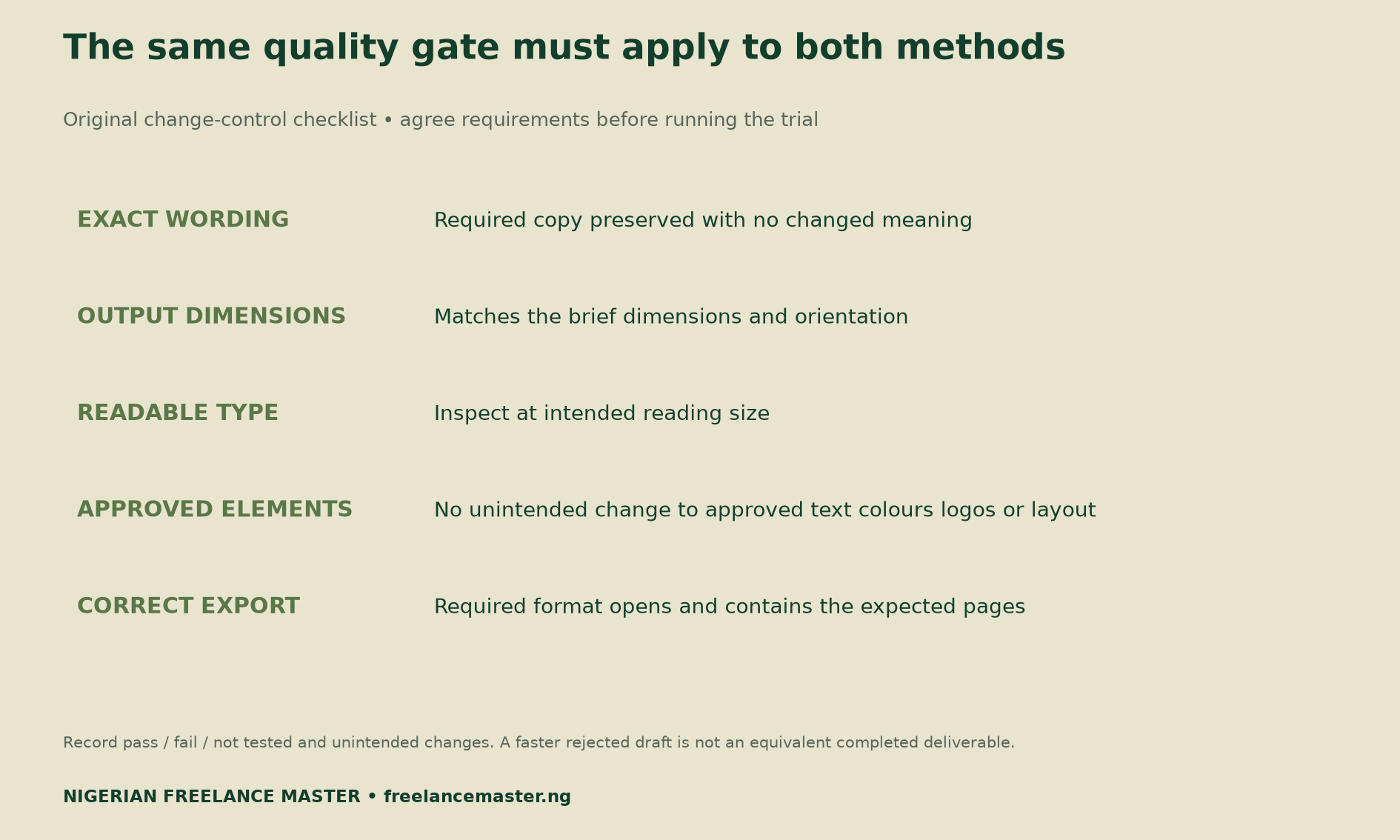
Do not compare a rejected draft with an accepted final file as though they were equivalent work. Record the initial failure, any repair and the time to the accepted version. If neither method produces an accepted output, report that outcome plainly.
For multi-page work, inspect every required page. A correct first page does not establish that a sweeping change worked throughout the document. Similarly, a screenshot cannot confirm that the final export contains the expected pages or file format.
Calculate genuinely saved time
For each accepted pair, total all six time fields for the manual method and for Brush. Subtract Brush’s total from the manual total. A positive difference indicates less time in that pair; a negative difference means Brush took longer.
Keep the per-brief results visible. With only six convenience briefs, a single large job can dominate an average. Describe the range and explain any failed or unmatched pairs. Do not present the small personal trial as a Nigerian design-industry benchmark.
Only count savings that you could actually use. Time released between tasks may improve flexibility without creating an extra billable hour. If the work cannot support additional revenue, a break-even estimate based on billable time needs that qualification.
Use a break-even calculation with your own inputs
Required saved hours = incremental monthly tool cost ÷ your chosen value per genuinely saved hour. Use the extra cost caused by the decision, not a subscription you would keep unchanged regardless. Include any relevant additional costs in your own comparison.
For illustration only, an extra monthly cost of ₦12,000 divided by a chosen hour value of ₦3,000 requires four genuinely saved hours. Neither number is a Canva price or a recommended freelance rate. Replace both before using the model for a purchase decision.
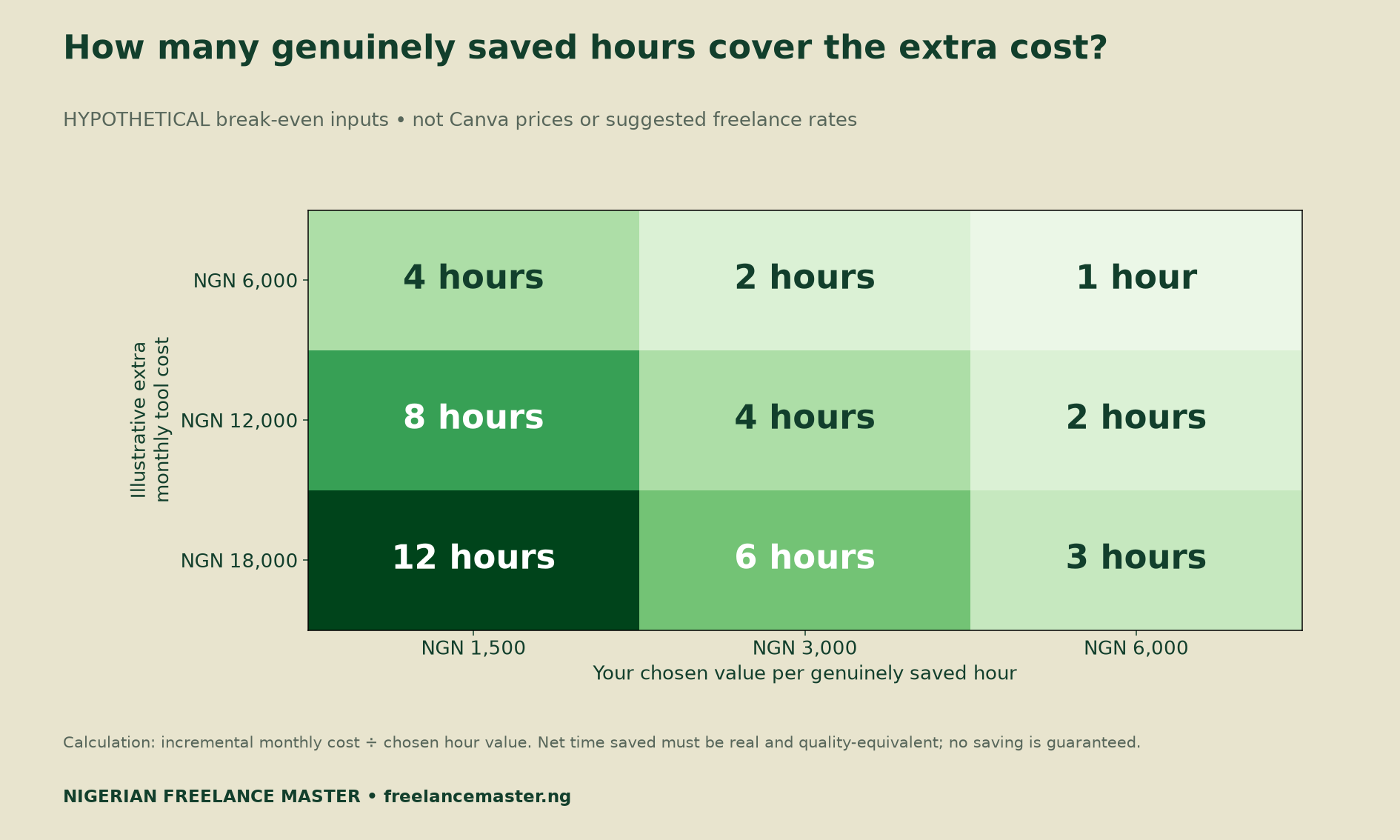
If genuinely saved hours are zero, there is no time-saving payback under this model. You may still value a feature for other reasons, but state that reason separately. Do not force the worksheet to show a financial gain.
Decide what to change after the evidence
A reliable improvement could support better turnaround, greater capacity or a stronger margin within the agreed scope. It does not automatically require a lower price. Review the actual contract, quality requirements and capacity before promising a new deadline.
For related skills, our guide to bounded AI orchestration services explains acceptance tests and evidence. The 90-day freelance channel audit helps you track real receipts and acquisition-plus-delivery hours after work is complete.
Download the protocol and calculation tools
Canva claim register (CSV) preserves the two vendor claims, comparator and interpretation limits.
Blank six-brief paired trial log (CSV) contains twelve planned method rows with timing and outcome fields left unmeasured.
Change-control and quality checklist (CSV) records requirements, unintended edits and corrections. Its results begin as not tested.
Hypothetical break-even scenarios (CSV) reproduces the nine grid cells. Currency is naira and output is hours, using illustrative inputs only.
Methodology and limits
We verified the original announcement and its date on 31 October 2026. We treat the speed and cost statements as vendor claims, with no conversion into absolute freelancer time or subscription charges. No in-account availability check or tool trial was performed for this report.
The original contribution is the paired protocol, time log, quality checklist and reproducible sensitivity grid. Account limits, task support, network conditions and tool behaviour can change. Retain each trial’s date and evidence when updating this resource.
Suggested citation: Nigerian Freelance Master, “Canva Brush Freelance Workflow: Test the Real Savings,” 31 October 2026. Credit Canva for its launch claims and identify our test protocol and cost scenarios as proposed or hypothetical.


