




An internet data budget for Nigerian freelancers should begin with the work you need to deliver. Count client downloads, uploads, calls and background transfers before choosing an allowance. A network-wide subscriber average cannot tell you how much data your next project will require.
This guide uses MTN Nigeria’s latest operating figures as context, then builds an explicitly hypothetical monthly workload. It includes five figures, a seven-day measurement sheet and a plan-comparison template. Replace the example inputs with your own observations and dated provider quotes.
Research checked 31 October 2026. No personal usage trial or provider-price survey was performed. All workload and naira-cost examples below are hypothetical.
What MTN’s latest usage averages measure
MTN Nigeria’s 30 October earnings release reports 57.2 million active data users at September, up 12.0% year-on-year. Average monthly usage per active data user was 15.3GB for the nine-month period and 17.2GB for Q3. Network data traffic rose 30.1%, while fibre-to-the-home carried about 13% of total data traffic.
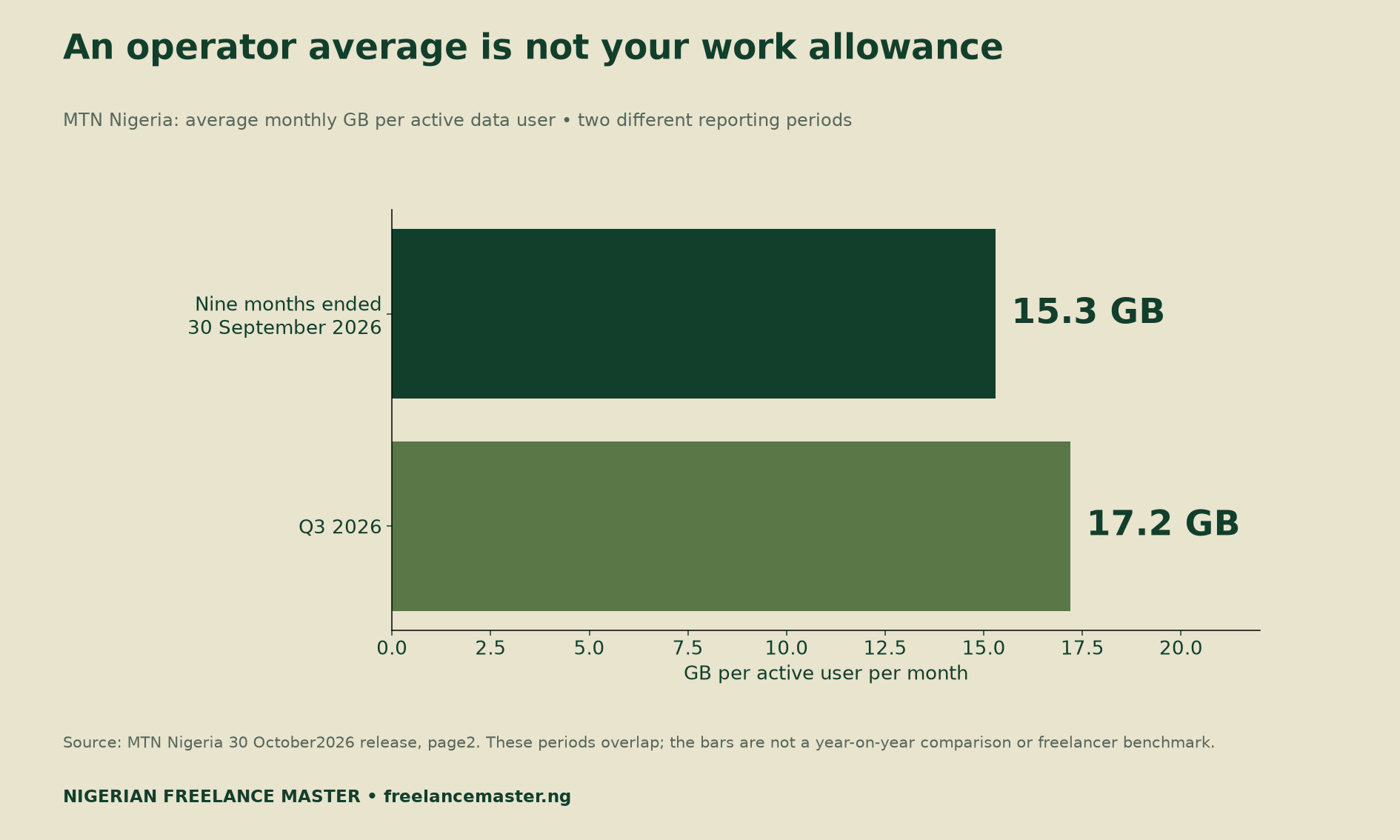
Those company figures do not identify freelancer needs, current bundle prices or service quality at your address. The two usage periods overlap, so they are not a year-on-year comparison. Traffic growth is not retail-price inflation, and fibre’s traffic share is not its household coverage.
Measure your workload before buying more data
Choose a normal seven-day working period and record the activities that transfer data. Keep downloads and uploads in separate columns. Include source files, review versions, final exports, calls, cloud synchronisation and software updates. Note which activities recur and which are unusual one-off transfers.
Use one consistent measurement source where possible. For example, a router total may already include an application’s downloads and uploads. Adding the same application totals again would double-count those bytes. An activity log can explain a master total without being an extra amount to add to it.
Also separate work use from personal use. If one connection serves both, document how you allocate shared traffic and costs. An approximate work share should remain labelled approximate. Do not present a rough allocation as a precise provider measurement.
Seven days can miss a large monthly update or an unusually busy delivery week. Therefore, keep a separate list of known one-off transfers and upcoming projects. Extend the observation period when the first week does not represent your normal workload.
Build an internet data budget for Nigerian freelancers
Consider an illustrative month with eight client projects. Each requires a 2GB source download and two uploads of 0.5GB each. Project transfers therefore total 8 × (2 + 2 × 0.5) = 24GB. These are chosen assumptions, not measured averages for any profession.
Suppose calls account for another 10GB and updates or background traffic add 6GB. The work subtotal becomes 24 + 10 + 6 = 40GB. We have not measured those activities; the example demonstrates how to build and audit the arithmetic.
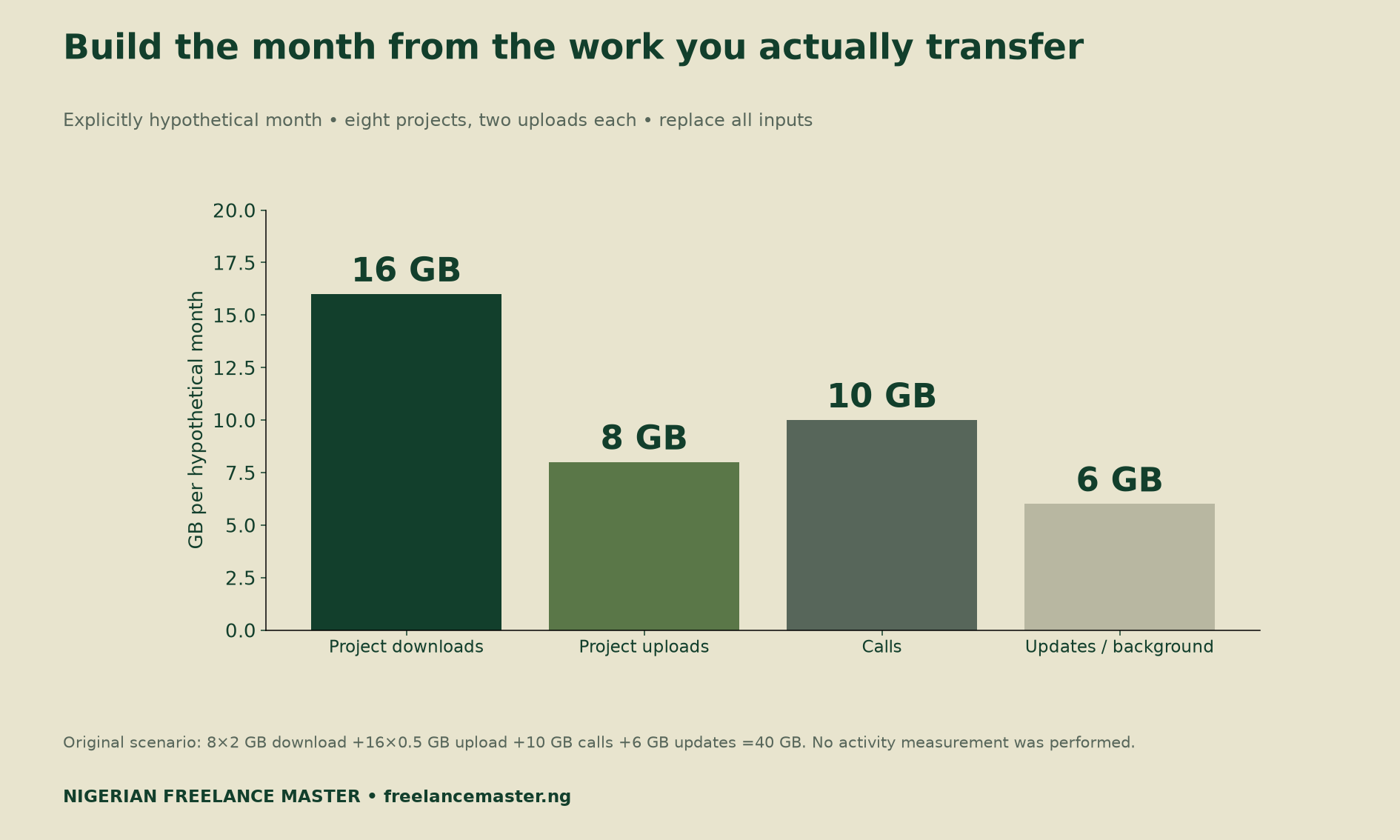
A writer exchanging small documents may have a different transfer pattern from an editor receiving large source files. Project count alone will not capture that difference. Record the size and number of transfers, including review rounds and necessary re-uploads.
Calls also vary with the actual settings and duration. Measure your own usage rather than assuming that a fixed number of meetings always consumes the same amount. Keep work hours, call hours and transferred gigabytes as distinct units.
Choose a buffer and label it as a choice
A planning allowance can cover uncertainty, but no single percentage suits every workload. In our example, a chosen 20% buffer adds 8GB to the 40GB subtotal. The resulting plan is 40 × 1.20 = 48GB. It is not a claim that every Nigerian freelancer needs 48GB.
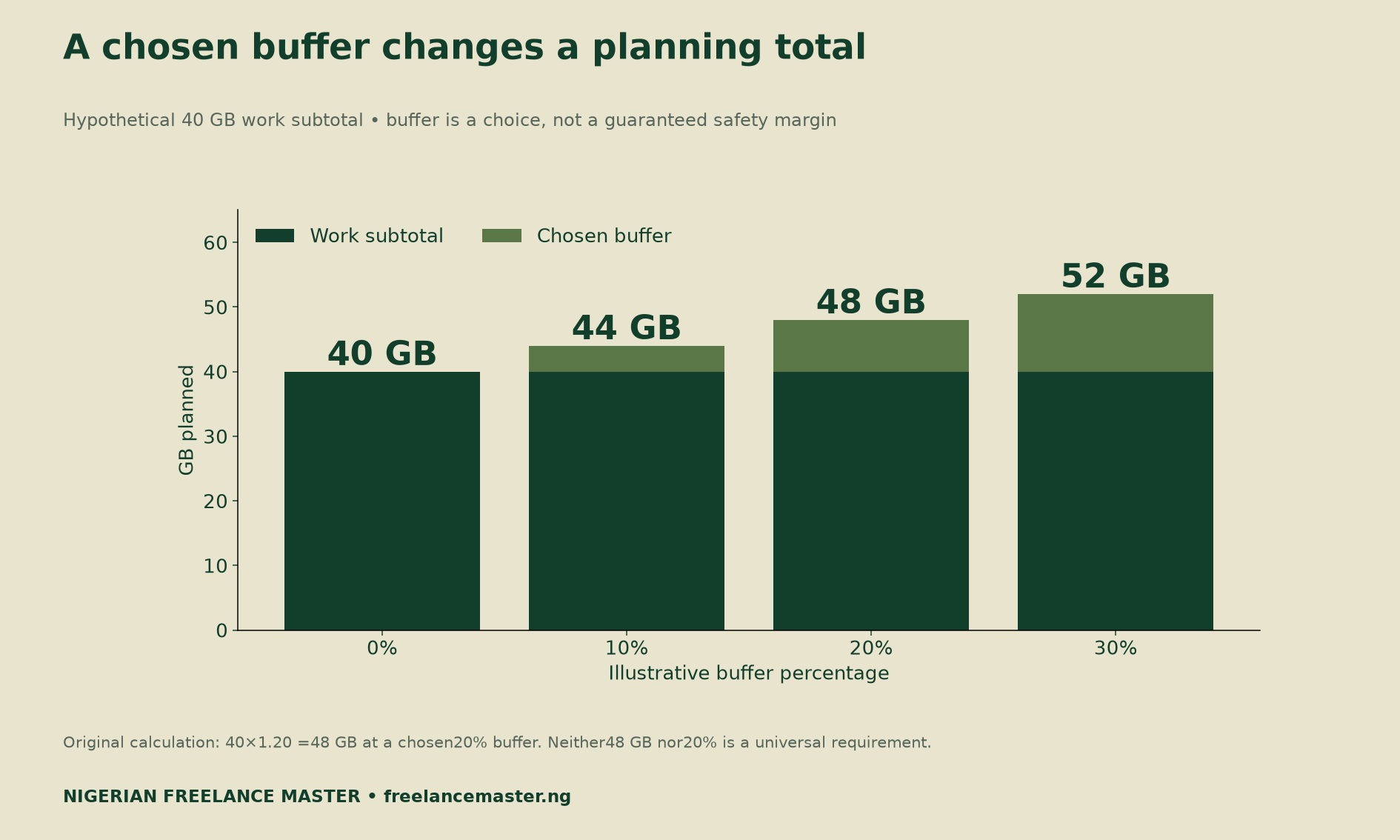
If a client adds a much larger source download, revise the workload model directly. A percentage buffer should not conceal a known extra project. Likewise, record actual failed-transfer usage if it occurs instead of applying an invented universal retry rate.
After the month, compare planned and actual work usage. Explain material differences, such as extra revision rounds or a software installation. This creates a useful history for your own business without turning a small personal log into a national benchmark.

Compare current plans on usable terms
Once the required workload is clearer, collect dated quotes for plans you can actually use. Record the price, validity period, usable allowance and any relevant fair-use or speed terms. Keep the provider’s source link or written quote so you can recheck the details later.
A headline allowance is not enough for a comparison if its availability or restrictions differ. Check whether the quoted plan covers your intended connection and work schedule. If a condition is unclear, leave that field unresolved until the provider explains it.
Include equipment and backup costs using a consistent period. For equipment, state how you allocate a one-off purchase across months; that allocation is an accounting assumption. Do not silently count the full purchase price in one option and a monthly allocation in another.
This report supplies no current bundle prices, network ranking, speed test or address-level fibre check. Verify those inputs for your location before spending money. An operator’s national traffic figures cannot establish that a connection will meet your delivery needs.
Allocate connectivity cost to your business
Add the work-related plan cost, chosen equipment allocation and backup cost for the same period. Then divide that total by billable hours for a business-planning allocation. Keep billable hours separate from total time spent working; the denominator changes the result.
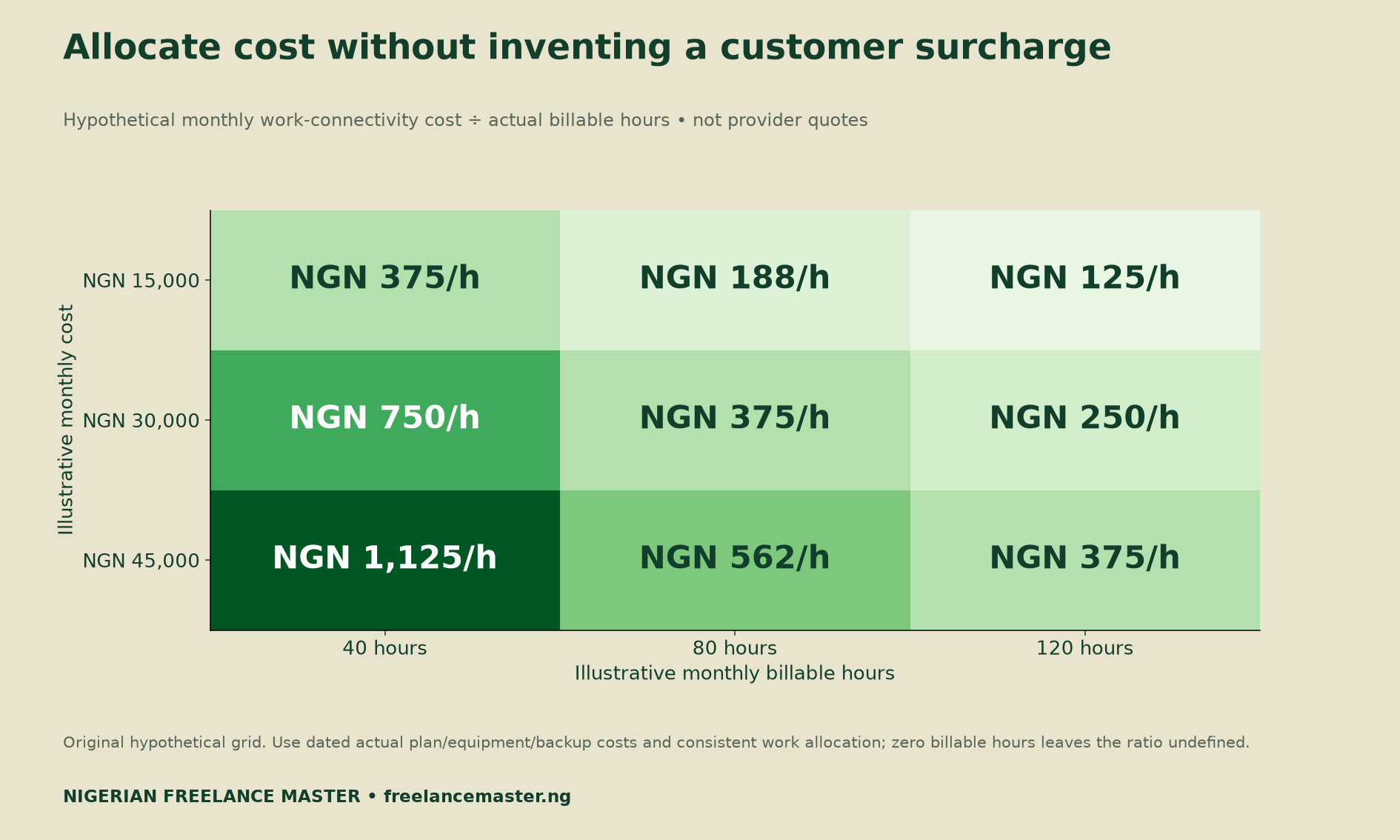
For example, a hypothetical NGN 30,000 monthly work-connectivity cost divided by 80 billable hours gives NGN 375 per billable hour. That is an internal allocation, not an automatic customer surcharge or a recommended freelance rate. Your actual commercial terms still govern what you invoice.
The 90-day freelance channel audit provides a broader way to compare receipts, direct costs and time. If design software is another expense, the Canva Brush workflow guide explains how to test savings before changing prices. Avoid charging the same cost twice across overlapping calculations.
Use a simple monthly review
Start with observed transfers, explain how you projected recurring work and list known unusual downloads separately. Next, state your chosen buffer and retain the assumptions. Finally, compare actual usage with the plan after a meaningful change in workload or provider terms.
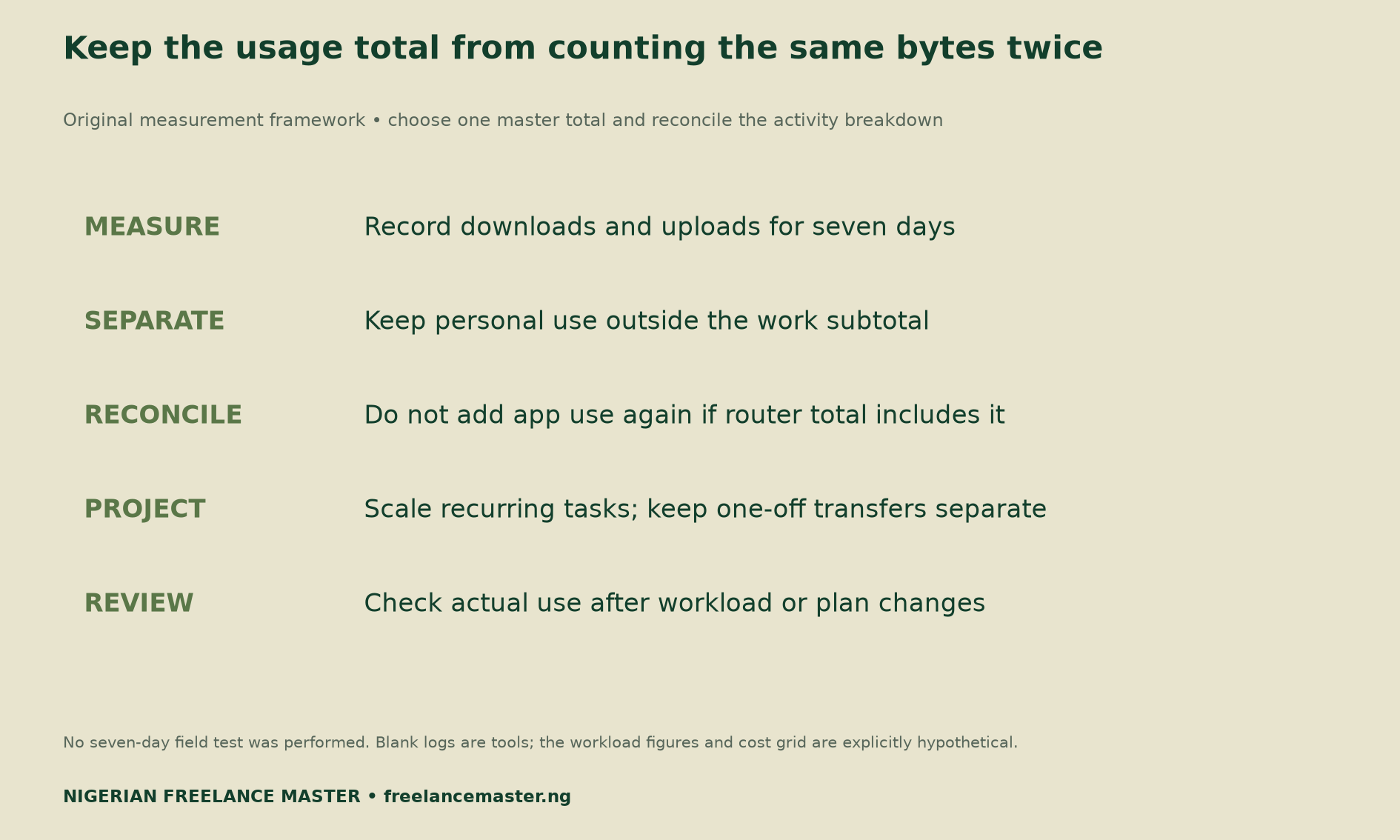
A useful budget remains editable. It should help you identify why a month differs from the last, rather than lock you into a supposedly universal data requirement. Review it when file sizes, revision rounds, call habits or software needs change.
Download the data-budget tools
MTN context and reporting-period register (CSV) preserves the company measures and their limits.
Hypothetical monthly workload calculation (CSV) contains the inputs behind the 40GB subtotal and 48GB buffered example.
Blank seven-day usage measurement sheet (CSV) separates downloads, uploads, recurring work and possible overlap with router totals.
Blank dated-plan cost comparison (CSV) records price, validity, usable allowance, equipment, backup and billable-hour allocation. Fill the arithmetic only after entering consistent actual inputs.
Methodology and limits
We checked MTN Nigeria’s original NGX-filed release and visually inspected the usage paragraph on page 2. Company measures provide context only. Our original contribution is the transparent workload arithmetic, buffer sensitivity, hypothetical cost grid and blank measurement tools.
No personal usage test, retail-price survey or connection-quality study was performed. GB figures in the example use one consistent stated unit; keep your device and provider units consistent when replacing them. Suggested citation: Nigerian Freelance Master, “Internet Data Budget for Nigerian Freelancers: A Workload Calculator,” 31 October 2026. Attribute company statistics separately to MTN Nigeria.


